Walking Trip

📅

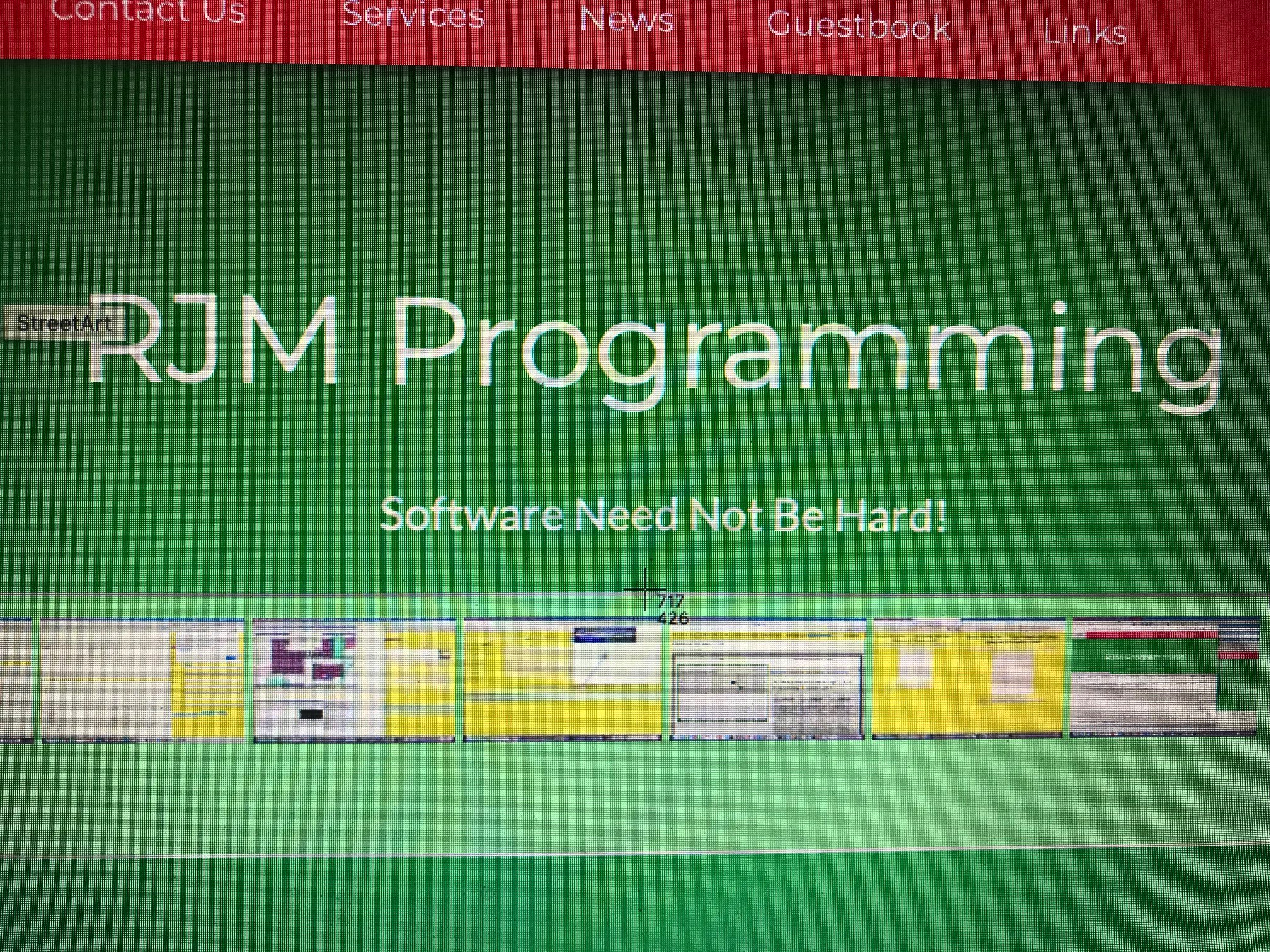
Screen Co-ordinates Helper Primer Tutorial
There’s a really good macOS keyboard shortcut we’d like to discuss today. It’s …
To take a screenshot of part of the screen, press Shift-Command-4 and then drag the cursor to outline the area you want to capture. If you want to capture a specific window, press Shift-Command-4. Hit the spacebar.
But it’s the “half-way” point with this we particularly noticed using web browsers. In the past when we’ve constructed HTML image maps we’ve often relied on Mobilefish.Com and its excellent Image Map Creation software to help us out, but this shift-command-4 keyboard shortcut’s way of displaying screen pixel co-ordinates could be another option here. Or it could be used in overlay position:absolute; left:[X]px; top:[Y]px; positioning scenarios, to good effect, we can envisage.
Mind you, other environments have their equivalents, too!
The woooooorrrrrllllllddd’s your better X and Y positioned oyyyyyyyster!
If this was interesting you may be interested in this too.
PHP Exif Quiz Data Subject Zoom Tutorial
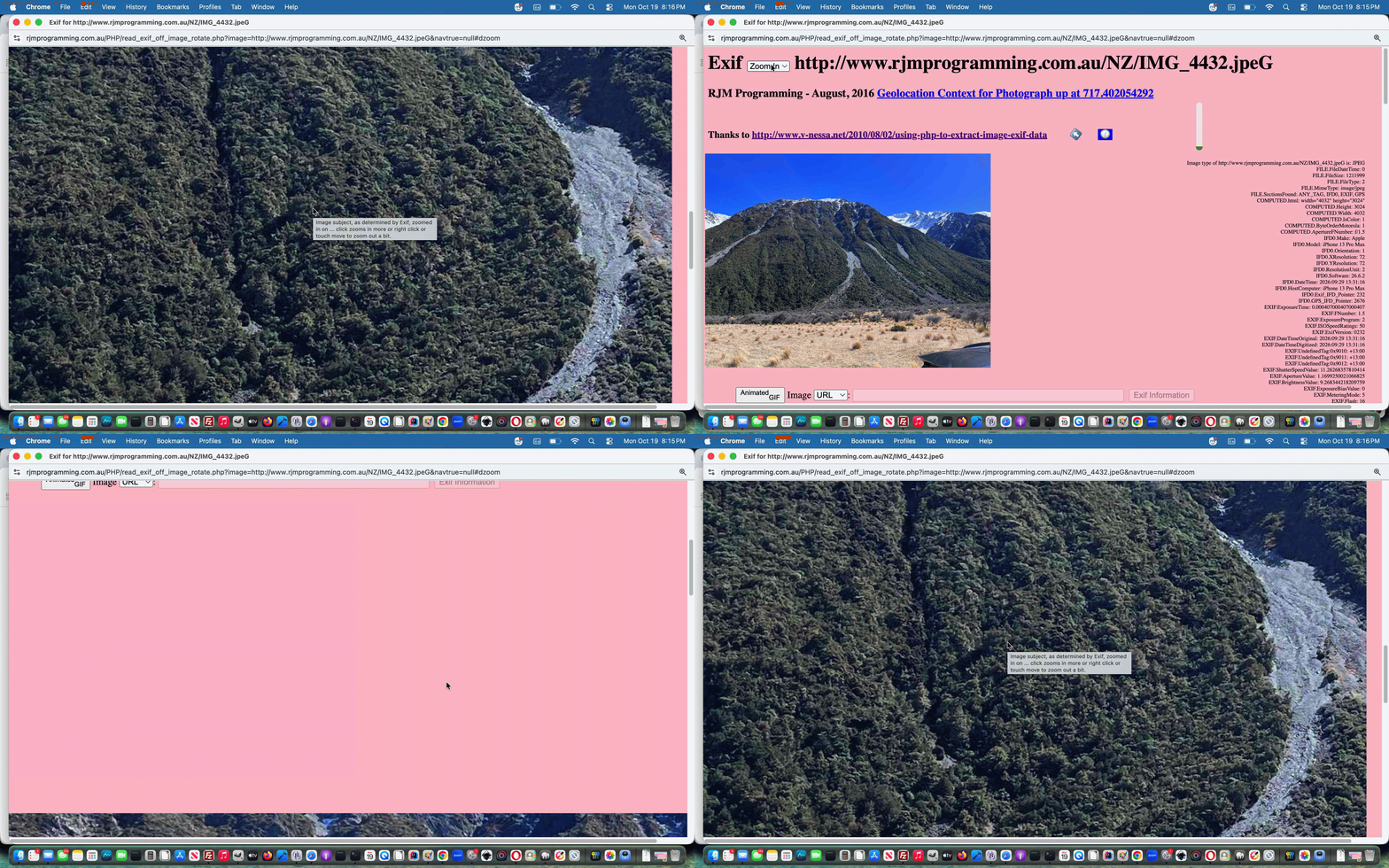
Delving more into Exif data related issues, as with yesterday’s PHP Exif Quiz Data Nuances Tutorial, we were intrigued by Exif data items such as …
EXIF.SubjectLocation: 2014,1514,2218,1328
… and our research tells us sometimes it may go “EXIF.SubjectArea 2014,1514,2218,1328”. That research lead us to realize that Exif data item can be used to filter the photograph image data and clip and crop to the graphics part Exif assesses as the “subject” of the photograph.
We came up with the PHP …
<?php
    // Thanks to https://www.google.com/search?q=show+img+within+div+cropped&rlz=1C5OZZY_en&oq=show+img+within+div+cropped&gs_lcrp=EgZjaHJvbWUyBggAEEUYOTIJCAEQIRgKGKABMgkIAhAhGAoYoAEyBwgDECEYjwIyBwgEECEYjwLSAQg5Njc4ajBqN6gCALACAA&sourceid=chrome&source=chrome.ob&ie=UTF-8

    $clockline2.="\n document.getElementById('topsel').innerHTML+='<option id=optzoom value=zoomin>Zoom In</option>'; \n";

    $clockline2.="\n document.getElementById('optzoom').title=' ... on Exif photograph subject'; \n";

    $clockline2.="\n document.getElementById('dzoom').style.display='none'; \n";

    $clockline2.="\n document.getElementById('dzoom').style.overflow='hidden'; \n";

    $clockline2.="\n document.getElementById('dzoom').title='Image subject, as determined by Exif, zoomed in on ... click zooms in more or right click or touch move to zoom out a bit.'; \n";

    $clockline2.="\n document.getElementById('dzoom').style.height='" . $valsare[2] . "px'; \n"; // was width

    $clockline2.="\n document.getElementById('dzoom').style.width='" . $valsare[3] . "px'; \n";

    $clockline2.="\n document.getElementById('dzoom').innerHTML='<img onload=altize(this); id=izoom style=position:absolute;left:-" . ($valsare[1] - ($valsare[3] / 2)) . "px;top:-" . ($valsare[0] - ($valsare[2] / 2)) . "px; src=" . $image . " alt=></img>'; \n";

    $clockline2.="\n document.getElementById('dzoom').setAttribute('data-scale','0.104'); \n";

    //$clockline2.="\n document.getElementById('dzoom').style.transformOrigin='top left'; \n";

    $clockline2.="\n document.getElementById('dzoom').style.transform='scale(0.104)'; \n";

    $clockline2.="\n document.getElementById('izoom').onclick=function(event){  document.getElementById('dzoom').setAttribute('data-scale','' + eval(0.1 + eval(document.getElementById('dzoom').getAttribute('data-scale'))));   document.getElementById('dzoom').style.transform='scale(' + eval(document.getElementById('dzoom').getAttribute('data-scale')) + ')';   }; \n";

    $clockline2.="\n document.getElementById('izoom').oncontextmenu=function(event){ event.preventDefault(); document.getElementById('dzoom').setAttribute('data-scale','' + eval(-0.1 + eval(document.getElementById('dzoom').getAttribute('data-scale'))));   document.getElementById('dzoom').style.transform='scale(' + eval(document.getElementById('dzoom').getAttribute('data-scale')) + ')';   }; \n";

    $clockline2.="\n document.getElementById('izoom').ontouchmove=function(event){ event.preventDefault(); document.getElementById('dzoom').setAttribute('data-scale','' + eval(-0.1 + eval(document.getElementById('dzoom').getAttribute('data-scale'))));   document.getElementById('dzoom').style.transform='scale(' + eval(document.getElementById('dzoom').getAttribute('data-scale')) + ')';   }; \n";
?>
… using the changed PHP read_exif_off_image_rotate.php you might want to try standalone used in the Scenery Geolocation Quiz also shown below.
Previous relevant PHP Exif Quiz Data Nuances Tutorial is shown below.
PHP Exif Quiz Data Nuances Tutorial
We think the recent PHP Exif Quiz Question and Answer Tutorial‘s underlying …
PHP reading image Exif data
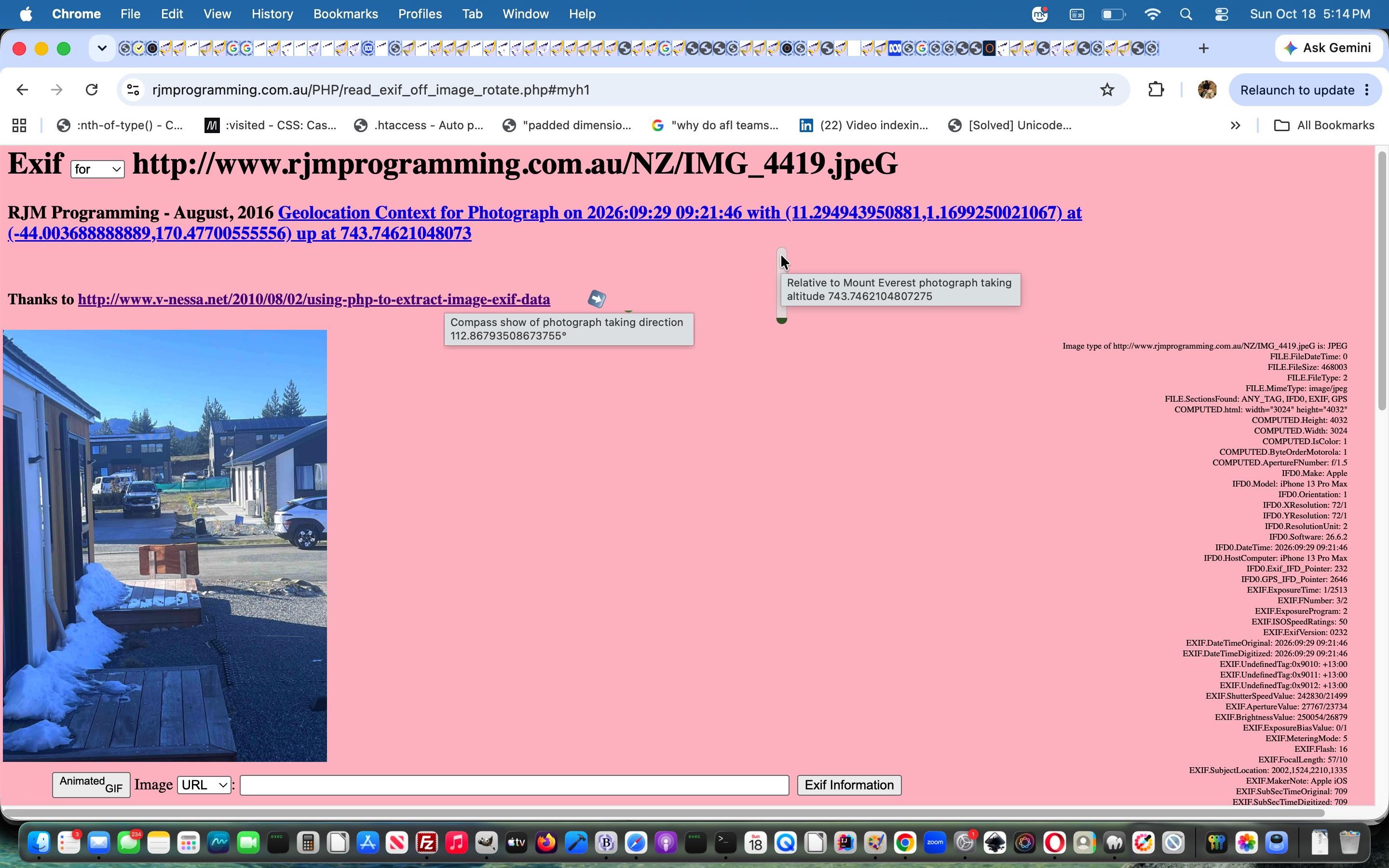
… talents can be extended via a couple of visual ways to enhance and represent two Exif data related pieces of information, those being …
… via new Javascript …
<?php echo ”
    var ibrgis=0.0, valisd='';

    if (document.getElementById('exw') && document.getElementById('mycompass')) {

    if (document.getElementById('mycompass').innerHTML == '') {

      var elids=['mycompass', 'myaltitude'];

      var exifids=['ImgDirection:', 'GPSAltitude:'];

      var rotids=['-999', '-90'];

      var contideas=[String.fromCodePoint(0x2B06,0xFE0F),''];

      for (var iio=0; iio<elids.length; iio++) {

      if (document.getElementById(elids[iio])) {

      if (document.getElementById('exw').innerHTML.indexOf(exifids[iio]) != -1) {

        ibrgis=0.0;

        valisd=document.getElementById('exw').innerHTML.split(exifids[iio])[1].split('&')[0].split('<')[0].trim();

        if (valisd.indexOf('/') != -1) {

         ibrgis=eval(valisd);

        } else if (valisd.trim() != '') {

         ibrgis=eval(valisd);

        }

        if (contideas[iio] == '') {

        document.getElementById(elids[iio]).innerHTML='<progress style=opacity:0.8;accent-color:green;height:45px; value=' + Math.round(ibrgis) + ' min=0 max=8850></progress>';

        document.getElementById(elids[iio]).onclick=function(event){  alert(document.getElementById('myaltitude').title); };

        document.getElementById(elids[iio]).title=document.getElementById(elids[iio]).title.replace(/.$/g, ' ' + ibrgis + '');

        document.getElementById(elids[iio]).style.display='inline-block';

        document.getElementById(elids[iio]).style.transform = ('rotate(' + rotids[iio] + 'deg) scale(" . $snbs . ")');

        } else {

        document.getElementById(elids[iio]).innerHTML=contideas[iio];

        document.getElementById(elids[iio]).onclick=function(event){  alert(event.target.title); };

        document.getElementById(elids[iio]).title=document.getElementById(elids[iio]).title.replace(/.$/g, ' ' + ibrgis + String.fromCodePoint(0x00B0) + '');

        document.getElementById(elids[iio]).style.display='inline-block';

        document.getElementById(elids[iio]).style.transform = ('rotate(' + Math.round(ibrgis) + 'deg)');

        }

      }

      }

    }

    }

    }
“; ?>
… via …
Previous relevant PHP Exif Quiz Question and Answer Tutorial is shown below.
PHP Exif Quiz Question and Answer Tutorial
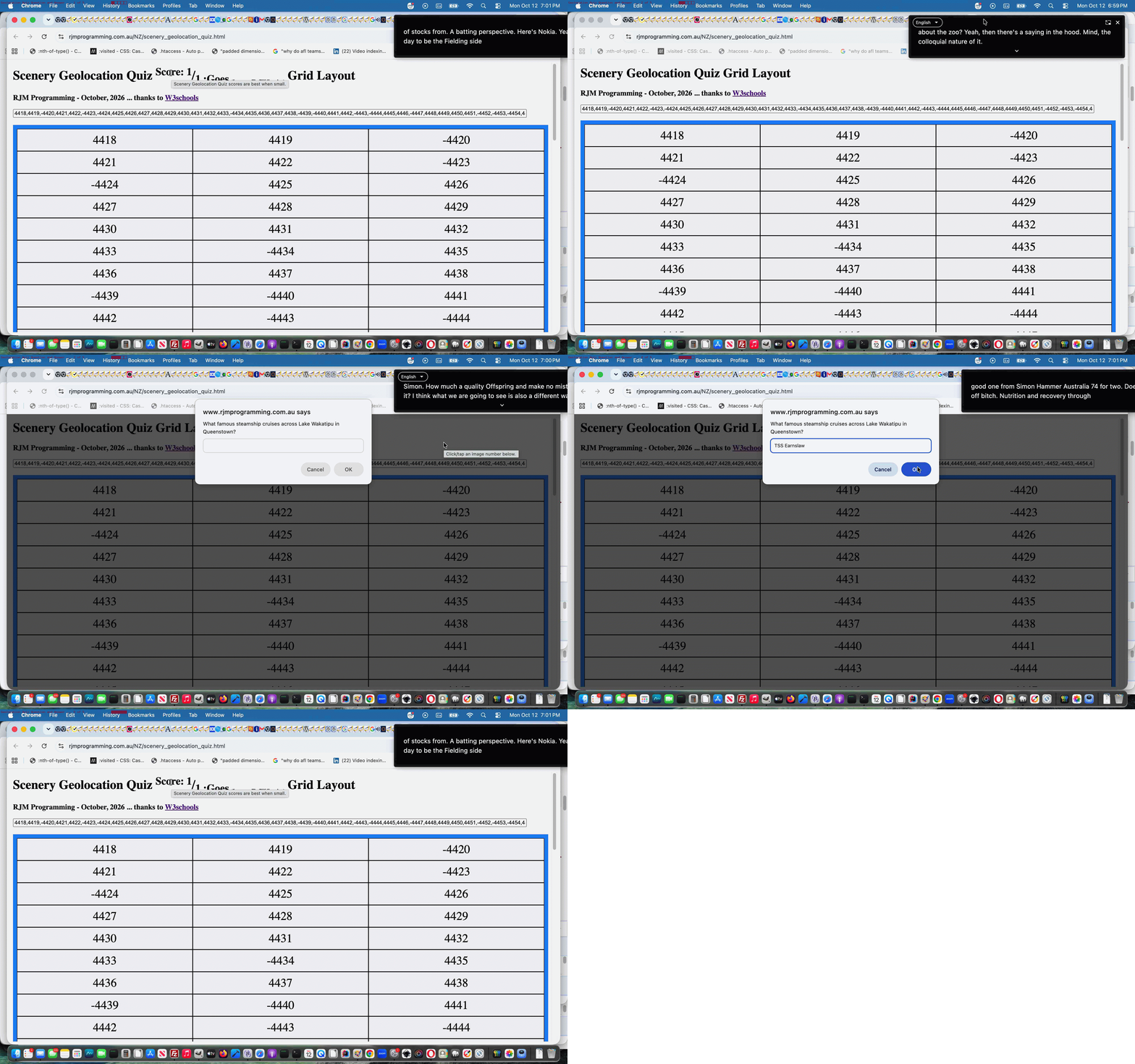
Regarding yesterday’s PHP Exif Quiz Geographicals Tutorial‘s Scenery Geolocation Quiz web application there were the image numbers which amounted to “unsuitable for Exif” purposes, which we negated, for us to consider, where to do nothing we deemed less ideal than to …
  var qs=["What is the tallest mountain on the South Island (and all of New Zealand)?",

  "What is the largest lake located on the South Island?",

  "In what year were the North Island and South Island officially named?",

  "Which famous historic church sits on the edge of Lake Tekapo?",

  "Which body of water separates the South Island from Stewart Island?",

  "What famous steamship cruises across Lake Wakatipu in Queenstown?",

  "Which limestone rock formations are a major tourist stop on the West Coast?",

  "What words could describe the character of the kea bird?",

  "What weight of wool in kilograms was Shrek as he exited the cave near Bendigo Station in 2004?",

  "What varietal of wine is grown in Central Otago?",

  "Is Cromwell's Big Fruit larger than Robertson's Big Potato?",

  "Is Lake Wanaka deeper than Sydney Harbour?",

  "Is Clutha River deeper than Sydney Harbour?",

  "What is the Māori name for New Zealand greenstone?",

  "In which river of the 1860s Otago gold rush was most gold found?",

  "Does New Zealand have a longer coastline than China?",

  "What sport do the All Whites play?",

  "What year were the All Blacks rugby team last beaten at Eden Park, here in October, 2026?",

  "If 73.6 million people, as of October 2026, live between latitude 45°N and 46°N how many million to nearest whole number live between latitude 45°S and 90°S?"];
  function quizimgid(divo) {

   var thisq=Math.floor(Math.random() * qs.length), wdsleft=0, ii=0, jj=0;

   if (divo.innerHTML.indexOf('-') == 0) {

   var ansis=prompt(qs[thisq], '');

   if (ansis == null) { ansis=''; }

   var wdsare=as[thisq].split(',')[0].split('(')[0].trim().replace(' / ',' ').replace(' at ',' ').toLowerCase().split(' ');

   wdsleft=wdsare.length;

   if (ansis.trim() != '') {

   var qansare=ansis.toLowerCase().split(' ');

   for (ii=0; ii<eval('' + qansare.length); ii++) {

     for (jj=0; jj<eval('' + wdsare.length); jj++) {

        if (wdsare[jj] == qansare[ii]) { wdsleft--;  }

     }

   }

   }

   if (wdsleft > 0) {

     forans=" <font size=1>(for answer " + as[thisq] + ")</font>";

   } else {

     forans=" <font size=6>(Congratulations!!)</font>";

   }

   document.getElementById('myh1').title='' + wdsleft;

   } else {

   divo.style.backgroundImage='url(//www.rjmprogramming.com.au/NZ/IMG_' + divo.innerHTML + '.jpeG)';

   divo.style.backgroundSize='contain';

   divo.style.backgroundRepeat='no-repeat';

   if (woo) {

     if (!woo.closed) {

       woo.close();

       woo=null;

     }

   }

   woo=window.open('//www.rjmprogramming.com.au/PHP/read_exif_off_image_rotate.php?image=http://www.rjmprogramming.com.au/NZ/IMG_' + divo.innerHTML + '.jpeG', '_blank', 'top=100,left=' + eval(-800 + screen.width) + ',width=800,height=800');

   }

  }
… as our way to add some variety to the quiz via a changed grid_fitting_in.html also shown below.
Previous relevant PHP Exif Quiz Geographicals Tutorial is shown below.
PHP Exif Quiz Geographicals Tutorial
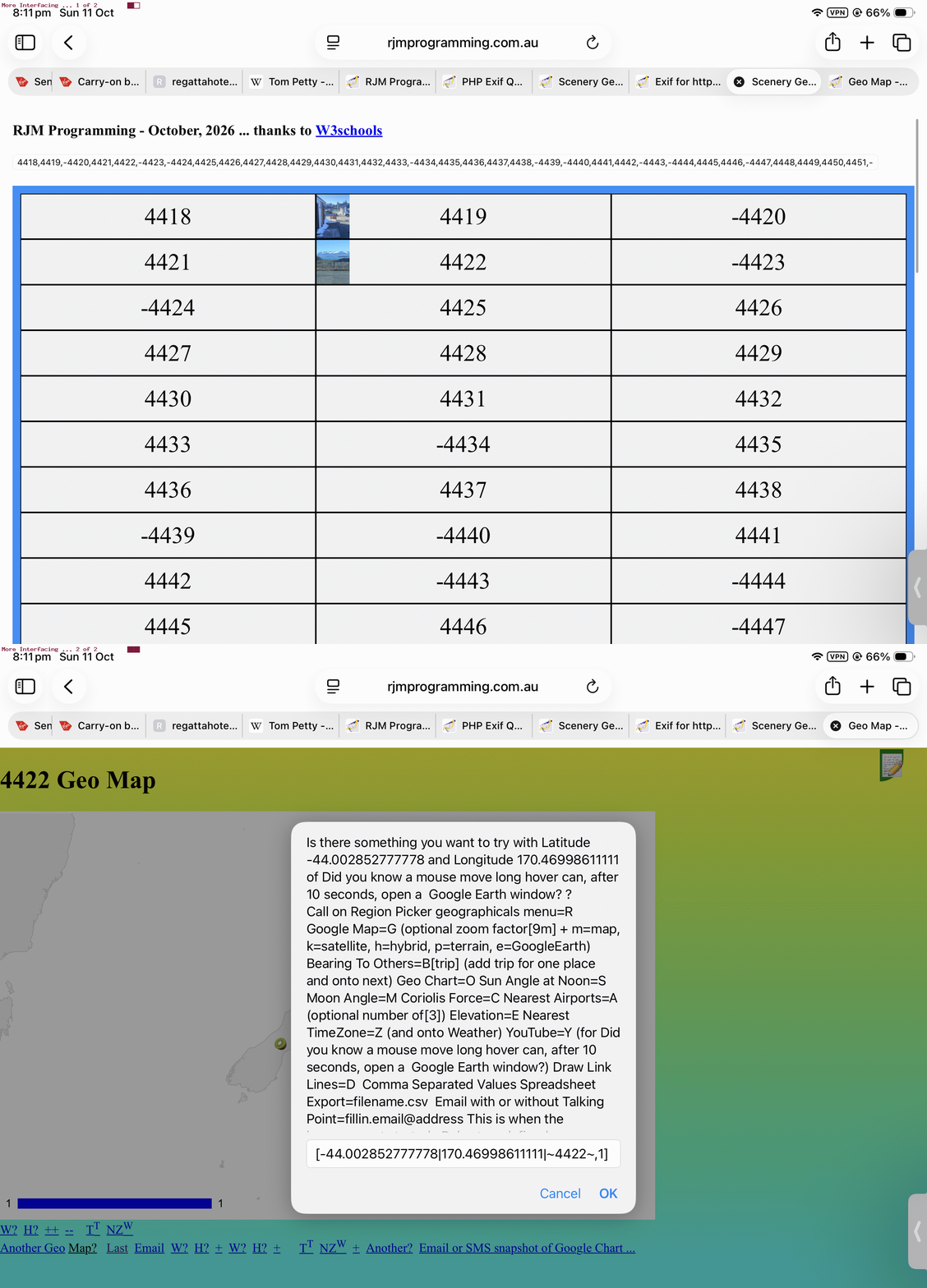
Yesterday’s PHP Exif Quiz Tutorial‘s Scenery Geolocation Quiz, as far as follow up “Geographicals Based Interfacings” went, offered …
… off which, it being “inhouse”, a click/tap offers other “Geographicals” (ie. latitude, longitude) based interfacing options … via …
Previous relevant PHP Exif Quiz Tutorial is shown below.
PHP Exif Quiz Tutorial
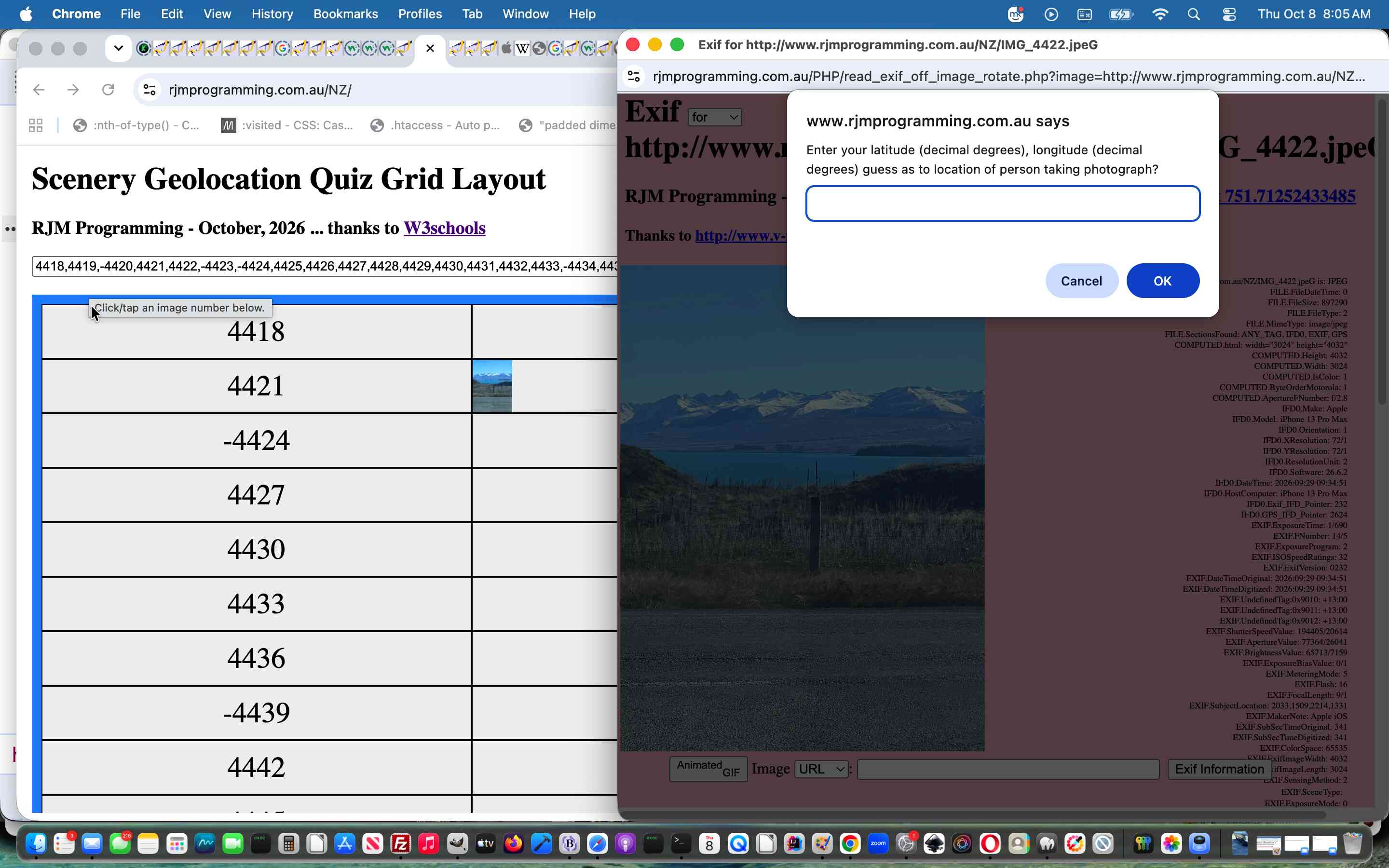
You guessed it? After yesterday’s …
… we’d be coming up with a …
Yay!!!!!!!!!!!!!!!!
Click here to see what we mean …
Did you know?
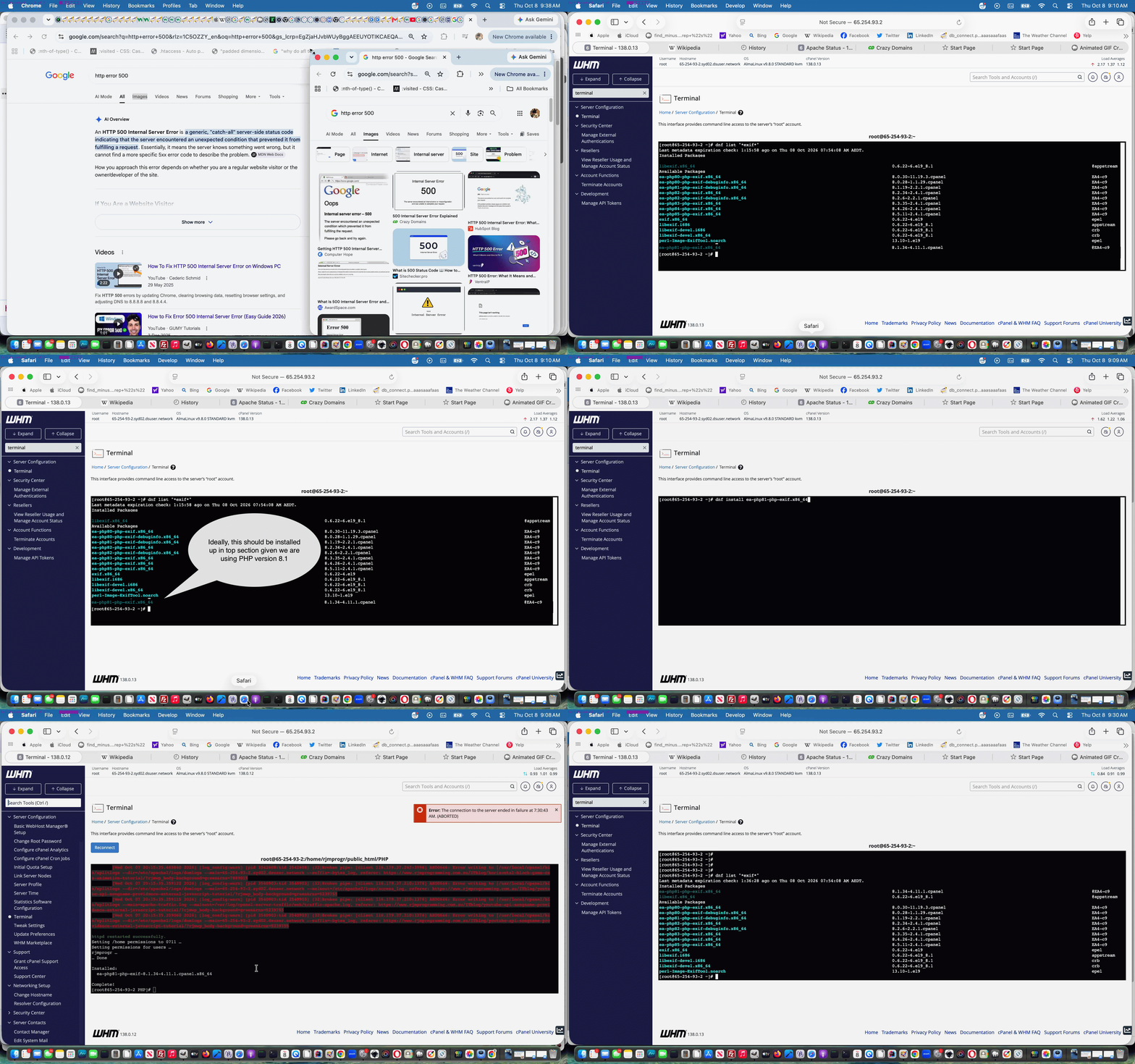
Regarding testing PHP web applications, especially up at our public RJM Programming website (more so because newer versions of AlmaLinux Apache/PHP/MySql configurations will drop some of the PHP modules you have previously (re-)installed, and you have to keep, at least for us, “stumbling onto” the issue), you can occasionally encounter …
HTTP Error Code 500 … Internal Error
… issues, as we did at one stage deploying the Scenery Geolocation Quiz above.
To both research the problem, and fix it we access the public RJM Programming AlmaLinux Apache/PHP/MySql website’s WHM cPanel environment’s web server command line accessing Terminal option, going …
Previous relevant PHP Exif Retention off iPhone Images Tutorial is shown below.
PHP Exif Retention off iPhone Images Tutorial
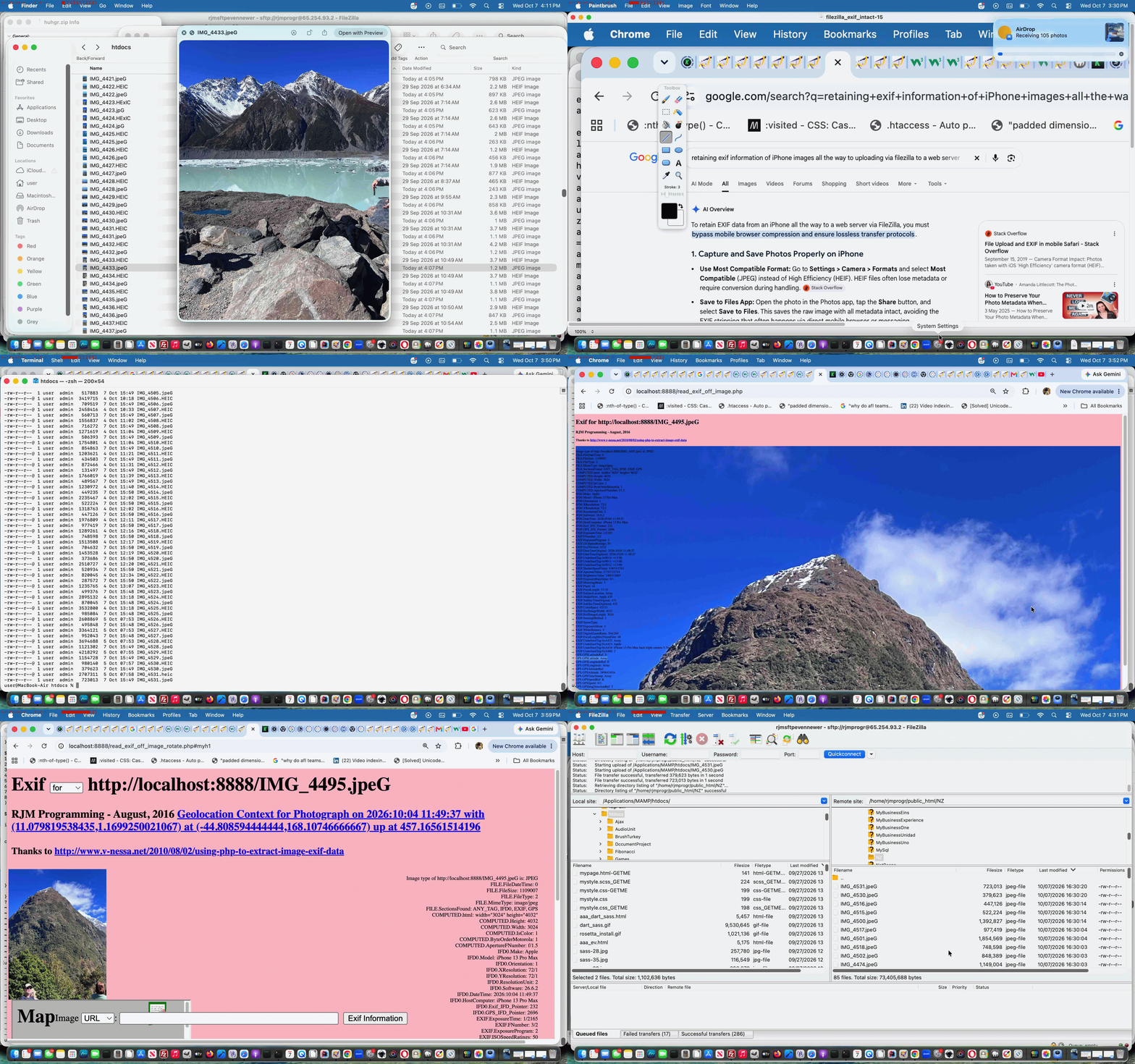
We have a new project on the go. We want to retain Exif information, that is contained within our iPhone’s *.HEIC formatted photographs, all the way through to some format and form of RJM Programming public website set of image media files.
And so, as well as referencing previous work such as that of PHP Exif Image Information Revisit Tutorial and Command Line ImageMagick HEIC to JPEG Image Creation Tutorial, we asked of Google retaining exif information of iPhone images all the way to uploading via filezilla to a web server, finding pertinent and useful the advice …
To retain EXIF data from an iPhone all the way to a web server via FileZilla, you must bypass mobile browser compression and ensure lossless transfer protocols.
AirDrop or Cable Transfer: Transfer the file from the Files app or Photos library to a Mac or PC using AirDrop or a direct USB cable.
And so, that is today’s first step on the new project, where if we cannot retain Exif the project is not worth continuing with.
Keep your hair on! It worked using our ImageMagick conversions to *.jpeG (from iPhone AirDropped *.HEIC) here on this MacBook Air and FileZilla (sftp) uploading those to our new folder on the RJM Programming web server for images like …

… as one example.
Previous relevant PHP Exif Image Information Revisit Tutorial is shown below.

PHP Exif Image Information Revisit Tutorial
Another “revisit” today to the PHP Exif Information web application displayer of PHP Exif Image Zip Mystery Game Hints Tutorial. Now supposing we put this scenario to you …
Now we ask you, in PHP, do you need to know the dimensions of that image to satisfy the requirements above? Well, we first thought (surely it must be) so, but going through the motions of doing today’s work, we realized that, though you can (for the PHP global $image variable with the image URL) …
list($width, $height, $type, $attr) = getimagesize($image);
… in PHP to determine those image dimensions, with the way our web application works, we didn’t need to, as you can “link” PHP with the CSS calc function to bypass any Javascript (eg. DOM) client script approach, abstracting the need to know hard and fast dimensions in PHP (and consequently not running into any window resizing or zooming issues (as a matter of fact, zooming up can make the Exif text information resize up quite nicely thank you very much and don’t mind if I do but we digress and so and usefully))
if ($image != "") {

  list($width, $height, $type, $attr) = getimagesize($image);

  // $iwidth=$width;

  // $iheight=$height;

  // $csswh=" width:" . $iwidth . "px; height:" . $iheight . "px; ";

  $csswh=" width: calc(100% - 10px); height: calc(100% - 220px); text-align: right; margin-right: 20px;  } form { position: absolute; left:50px; top: calc(100% - 45px); width:100%; height:40px; ";

}
… used later on to build up the HTML for the webpage, that also looks much better because the image and Exif wording are more likely to be separated from each other now …
$htmlis="<html><head>" . $javascript . "<style>" . $bcsscolour . " div { font-size:9px; overflow: visible; float:right; " . $csswh . " } </style><meta name='viewport' content='width=device-width, initial-scale=1, minimum-scale=0.25, maximum-scale=8, user-scalable=yes'><title>Exif for " . $image . "</title></head><body style='background-color:" . $bcolour . ";'><h1 id='myh1'>Exif <select onchange=\"if (this.value.length == 2) { top.alinktop=''; top.document.getElementById('dexif').innerHTML=''; top.location.href=top.document.URL.split('index.')[0]+'index-ssmhalf.html'; } else { var zipurl=prompt('Enter image zipfile URL for Mystery Trip game (good for 2 players)','mysterytrip.zip'); if (zipurl != null) { if (zipurl.toLowerCase().indexOf('.zip') != -1) { location.href=document.URL.split('#')[0].split('?')[0] + '?image=' + encodeURIComponent(zipurl); } } } \"><option value=''>for</option><option value=' '>zipfile</option>" . $anotheroption . "</select> " . $image . "</h1><h3>RJM Programming - August, 2016 <a id='ageolocation style='visibility:hidden;' href='#mygeolocation'>Geolocation Context for Photograph" . $various . "</a></h3><h4>Thanks to <a target=_blank title=Useful href=//www.v-nessa.net/2010/08/02/using-php-to-extract-image-exif-data>http://www.v-nessa.net/2010/08/02/using-php-to-extract-image-exif-data</a></h4><div onclick=\"window.open('" . $image . "','_blank','top=5,left=5');\" style='background-color:yellow; background: url(" . str_replace("/Applications/MAMP/htdocs/","http://localhost:8888/",$image) . ") no-repeat; background-position: 5px; background-size: contain; '><br>" . " Image type of " . $image . " is: " . $types[$imagetype];
The changed PHP read_exif_off_image_rotate.php includes these aesthetic and usability improvements you can test for yourself at this live run link.
Previous relevant PHP Exif Image Zip Mystery Game Hints Tutorial is shown below.
PHP Exif Image Zip Mystery Game Hints Tutorial
Just like with the recent PHP Wikipedia Geo Map Google Chart Tutorial we find a use for the talents of Google Chart …
… as we improve the functionality of our “Mystery Trip in Images Game” we started with yesterday’s PHP Exif Image Zip Mystery Game Primer Tutorial.
They are used respectively for …
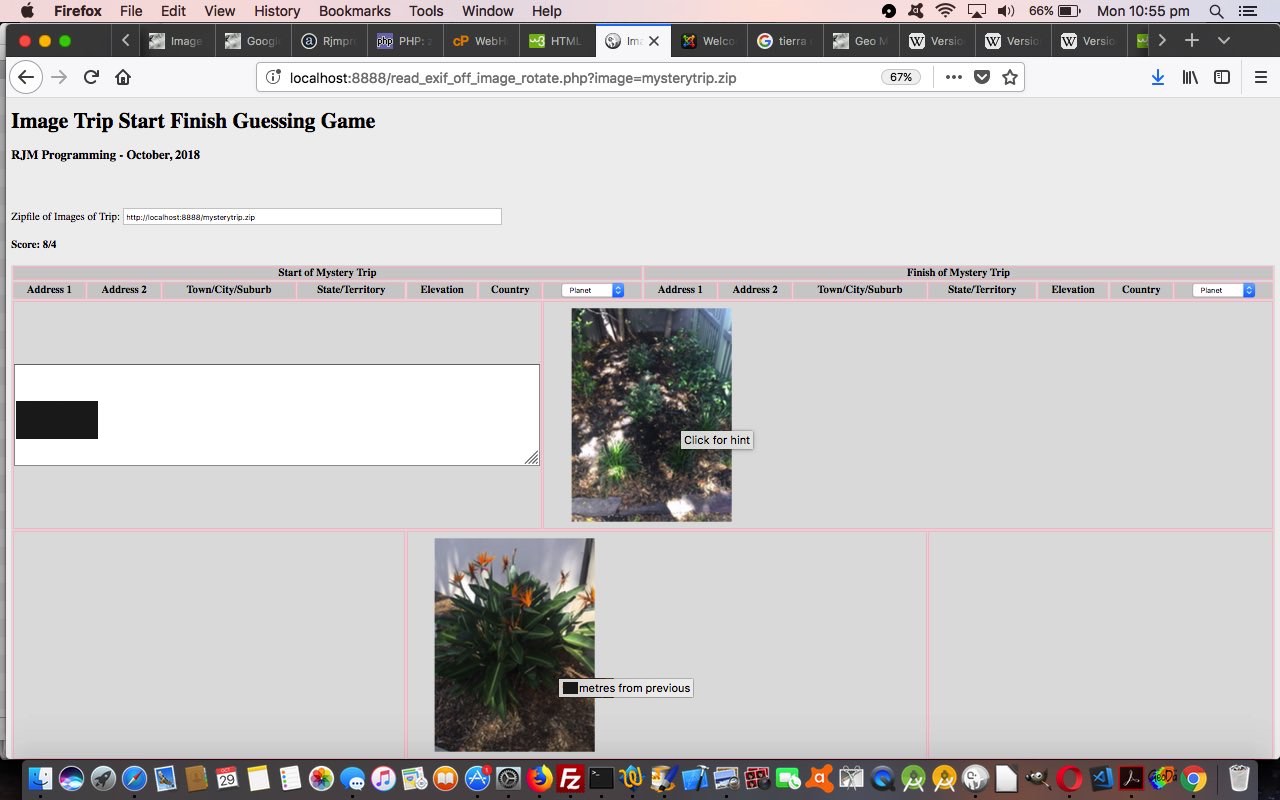
And so today we can take you to a real zip file of JPEG images of a Mystery Trip, taken on an iPhone that you can try with a second player at this live run link.
The photos were taken deliberately to be obtuse, so as not to give the game away with their visual content. How are we able to give you hints in a programmatical sense? Well, on a JPEG coming out of an iPhone there is geodata (metadata latitude and longitude) stored that we access via Exif image attribute (PHP) methods.
The changed PHP read_exif_off_image_rotate.php includes these “best for two player” game interactive improvements, as well as allowing the user be able to reach this Mystery Game from old URL (simpler) arrangements, from older incarnations (you can read below).
Previous relevant PHP Exif Image Zip Mystery Game Primer Tutorial is shown below.
PHP Exif Image Zip Mystery Game Primer Tutorial
There’s a fair bit to the design of a new game we’re developing that uses the image metadata ideas from PHP Exif Image Information Rotation Tutorial in its workings.
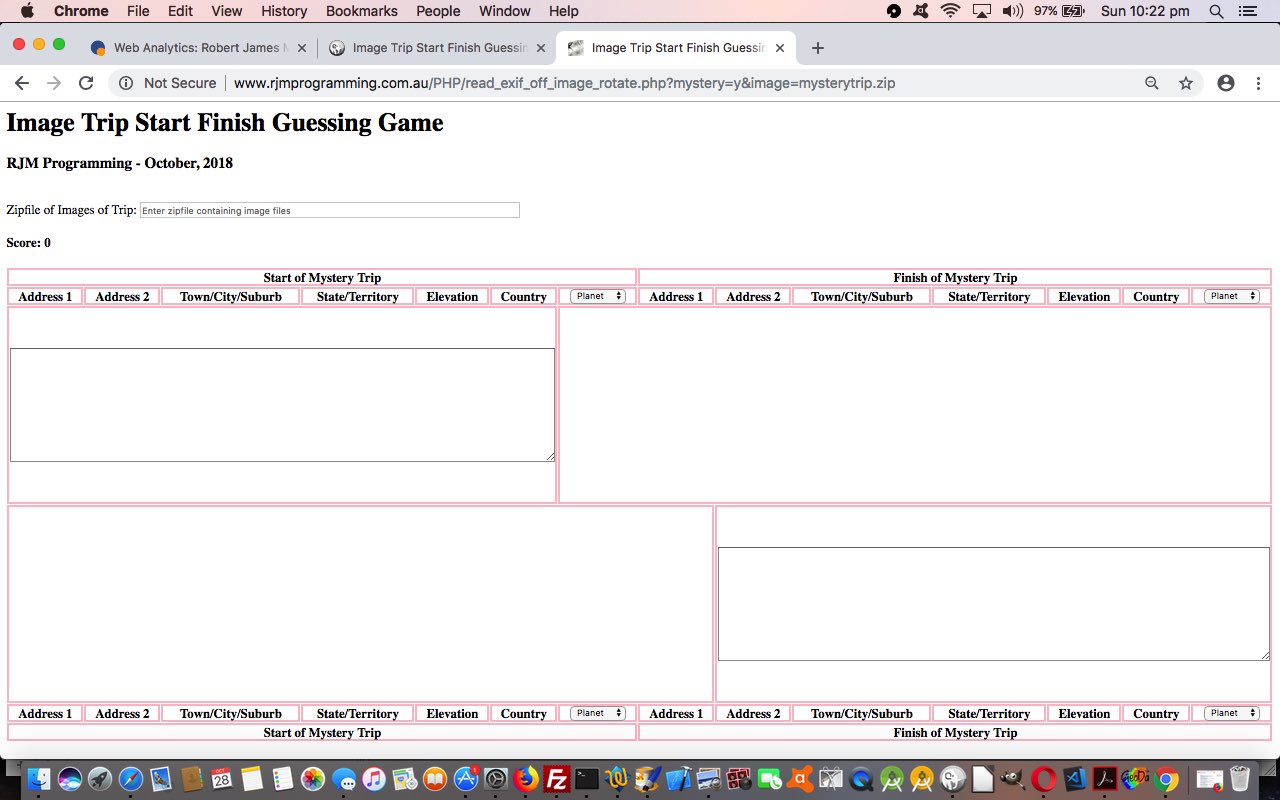
Our early days work starts down the road by collecting zipfile and other pertinent Exif data item ideas off …
As you can see to simplify things we are introducing PHP zipfile coding to group together a set of photographs into the one file concept.
It will be tomorrow that you see a more complete and rounded game solution, and by then we can come up with a name for it too!
Feel free to try the changed read_exif_off_image_rotate.php live run to try out this game in an early incarnation.
Previous relevant PHP Exif Image Information Rotation Tutorial is shown below.

PHP Exif Image Information Rotation Tutorial
The “Stop Press” of PHP Exif Image Information Primer Tutorial as shown below, introduced us to some PHP able to glean quite a bit of really useful Exif information stored with an image file, perhaps straight off a digital camera or mobile phone or mobile tablet. We use the great advice of http://www.v-nessa.net/2010/08/02/using-php-to-extract-image-exif-data to cycle through this information.
This information was of interest regarding …
Sometimes you’ll see Gimp using exif functionality when it becomes aware of the possibility your image could be rotated to advantage
… as we saw Gimp doing this in relation to a photograph image coming off my Android Mobile Phone that we used, in its “rotated-by-Gimp” form, in our recent Mindfulness Follow Up Tutorial. But how about if we want to detect what Gimp detects, to fix this camera orientation issue ourselves? Well, in amongst the Exif information, we found …
IFD0.Orientation: 6 … and then surfing the web we found …… which gave us the means to apply a rotation the way Gimp does. How did we decide to apply this rotation? There are lots of ways, and we decided on this occasion to use CSS and apply a background image, with a transformation, to an HTML div element, also showing all that Exif information. We do this with new PHP you could call read_exif_off_image_rotate.php that has this corresponding new live run link. To get there, from where we’ve last been, take a skeg here.
So, coming back to our “clouds” photo we saw an Exif IFD0.Orientation value of 6 and consulted this useful link to find that we should rotate the image by 90 degrees. We do this with the HTML and inline CSS that goes, for the encasing HTML div element …
<div style='background-color:yellow; background: url(clouds.jpg); opacity:0.6;  norepeat; -webkit-transform: rotate(90deg); -moz-transform: rotate(90deg); -ms-transform: rotate(90deg); -o-transform: rotate(90deg); transform: rotate(90deg); '>

</div>
… in regard to using the original camera image …

Now you may have heard of geographical knowledge stored within photographs, and perhaps you’ll see the live run‘s (turn your head or computer) …
GPS.GPSVersion
… that if fleshed out, with other data elements underneath, would put that image into the category of those where geographical information resides. You may want to start reading more about (the huge topic of) “Geotagging” from this useful Wikipedia webpage … thanks.
Previous relevant PHP Exif Image Information Primer Tutorial is shown below.
PHP Exif Image Information Primer Tutorial
Our (Mac OS X laptop) local MAMP web server is an Apache/PHP/MySql web server. In this environment you can find out a lot with some PHP code as per …
<?php phpinfo(); ?>
… and if, in doing this, you find a reference to the “exif” Exchangeable Image Information functionality existing, you are a lucky candidate to introduce some image “interrogation” (but not this) logic to your PHP code.
We followed a lot of the advice of the very useful link (thanks) to create some PHP called …
… where we may (or maybe not) be waking you up (before we go go ‘Cause I’m not plannin’ on going solo yo (to be honest, like)) … it’s a slow news day … to the fact that images can show on a web page but may not be all you would understand them to be … shock, horror!
Yes, an image that is a GIF in all but name will often display fine even if it’s been given a name like MyNameIs.Jpeg man person.
If this outrage makes you …
… then we’re here to tell you that you need to take a Bex and have a lie down.
In any case, there is a solution to this in PHP if the exif functionality is available to you, and this matter is of concern, and you can see us showing you how to test for that with the code above and this live run. Sometimes you’ll see Gimp using exif functionality when it becomes aware of the possibility your image could be rotated to advantage … we’ve had this happen and thanked Gimp with more than the usual toast and herbal tea offerings you’d be used to giving … we take it?!
Stop Press
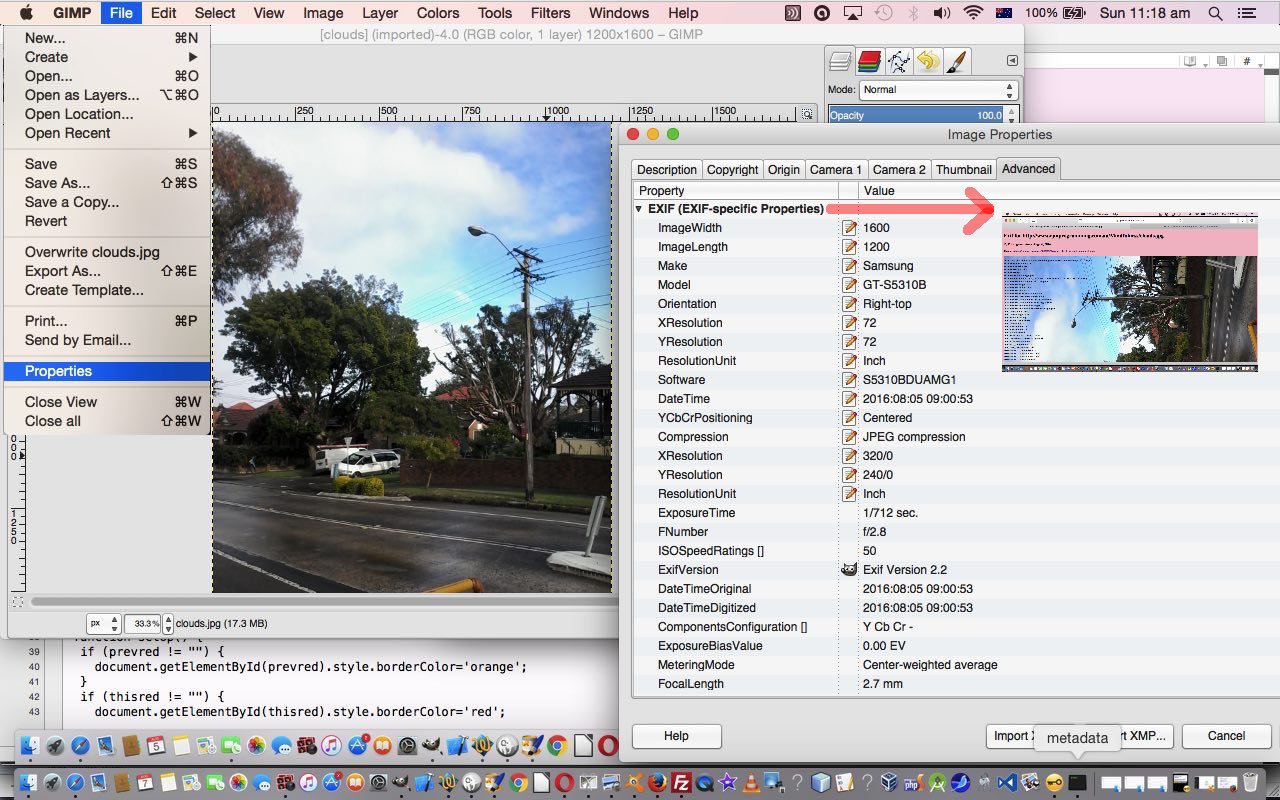
As of 8/8/2016 (well, what do you know? … understood everywhere!?) we’re revisiting Exif and PHP to learn more and our tutorial picture now reflects the early days of the revisit and the new resultant PHP we wrote, that you could call read_exif_off_image.php, inspired, largely from http://www.v-nessa.net/2010/08/02/using-php-to-extract-image-exif-data (thanks), and has this live run link, the output of which is pointed to by the red arrow in the tutorial picture.
If this was interesting you may be interested in this too.
If this was interesting you may be interested in this too.
If this was interesting you may be interested in this too.
If this was interesting you may be interested in this too.
If this was interesting you may be interested in this too.
If this was interesting you may be interested in this too.
If this was interesting you may be interested in this too.
If this was interesting you may be interested in this too.
If this was interesting you may be interested in this too.
If this was interesting you may be interested in this too.
If this was interesting you may be interested in this too.
PHP Exif Quiz Data Nuances Tutorial
We think the recent PHP Exif Quiz Question and Answer Tutorial‘s underlying …
PHP reading image Exif data
… talents can be extended via a couple of visual ways to enhance and represent two Exif data related pieces of information, those being …
… via new Javascript …
<?php echo ”
    var ibrgis=0.0, valisd='';

    if (document.getElementById('exw') && document.getElementById('mycompass')) {

    if (document.getElementById('mycompass').innerHTML == '') {

      var elids=['mycompass', 'myaltitude'];

      var exifids=['ImgDirection:', 'GPSAltitude:'];

      var rotids=['-999', '-90'];

      var contideas=[String.fromCodePoint(0x2B06,0xFE0F),''];

      for (var iio=0; iio<elids.length; iio++) {

      if (document.getElementById(elids[iio])) {

      if (document.getElementById('exw').innerHTML.indexOf(exifids[iio]) != -1) {

        ibrgis=0.0;

        valisd=document.getElementById('exw').innerHTML.split(exifids[iio])[1].split('&')[0].split('<')[0].trim();

        if (valisd.indexOf('/') != -1) {

         ibrgis=eval(valisd);

        } else if (valisd.trim() != '') {

         ibrgis=eval(valisd);

        }

        if (contideas[iio] == '') {

        document.getElementById(elids[iio]).innerHTML='<progress style=opacity:0.8;accent-color:green;height:45px; value=' + Math.round(ibrgis) + ' min=0 max=8850></progress>';

        document.getElementById(elids[iio]).onclick=function(event){  alert(document.getElementById('myaltitude').title); };

        document.getElementById(elids[iio]).title=document.getElementById(elids[iio]).title.replace(/.$/g, ' ' + ibrgis + '');

        document.getElementById(elids[iio]).style.display='inline-block';

        document.getElementById(elids[iio]).style.transform = ('rotate(' + rotids[iio] + 'deg) scale(" . $snbs . ")');

        } else {

        document.getElementById(elids[iio]).innerHTML=contideas[iio];

        document.getElementById(elids[iio]).onclick=function(event){  alert(event.target.title); };

        document.getElementById(elids[iio]).title=document.getElementById(elids[iio]).title.replace(/.$/g, ' ' + ibrgis + String.fromCodePoint(0x00B0) + '');

        document.getElementById(elids[iio]).style.display='inline-block';

        document.getElementById(elids[iio]).style.transform = ('rotate(' + Math.round(ibrgis) + 'deg)');

        }

      }

      }

    }

    }

    }
“; ?>
… via …
Previous relevant PHP Exif Quiz Question and Answer Tutorial is shown below.
PHP Exif Quiz Question and Answer Tutorial
Regarding yesterday’s PHP Exif Quiz Geographicals Tutorial‘s Scenery Geolocation Quiz web application there were the image numbers which amounted to “unsuitable for Exif” purposes, which we negated, for us to consider, where to do nothing we deemed less ideal than to …
  var qs=["What is the tallest mountain on the South Island (and all of New Zealand)?",

  "What is the largest lake located on the South Island?",

  "In what year were the North Island and South Island officially named?",

  "Which famous historic church sits on the edge of Lake Tekapo?",

  "Which body of water separates the South Island from Stewart Island?",

  "What famous steamship cruises across Lake Wakatipu in Queenstown?",

  "Which limestone rock formations are a major tourist stop on the West Coast?",

  "What words could describe the character of the kea bird?",

  "What weight of wool in kilograms was Shrek as he exited the cave near Bendigo Station in 2004?",

  "What varietal of wine is grown in Central Otago?",

  "Is Cromwell's Big Fruit larger than Robertson's Big Potato?",

  "Is Lake Wanaka deeper than Sydney Harbour?",

  "Is Clutha River deeper than Sydney Harbour?",

  "What is the Māori name for New Zealand greenstone?",

  "In which river of the 1860s Otago gold rush was most gold found?",

  "Does New Zealand have a longer coastline than China?",

  "What sport do the All Whites play?",

  "What year were the All Blacks rugby team last beaten at Eden Park, here in October, 2026?",

  "If 73.6 million people, as of October 2026, live between latitude 45°N and 46°N how many million to nearest whole number live between latitude 45°S and 90°S?"];
  function quizimgid(divo) {

   var thisq=Math.floor(Math.random() * qs.length), wdsleft=0, ii=0, jj=0;

   if (divo.innerHTML.indexOf('-') == 0) {

   var ansis=prompt(qs[thisq], '');

   if (ansis == null) { ansis=''; }

   var wdsare=as[thisq].split(',')[0].split('(')[0].trim().replace(' / ',' ').replace(' at ',' ').toLowerCase().split(' ');

   wdsleft=wdsare.length;

   if (ansis.trim() != '') {

   var qansare=ansis.toLowerCase().split(' ');

   for (ii=0; ii<eval('' + qansare.length); ii++) {

     for (jj=0; jj<eval('' + wdsare.length); jj++) {

        if (wdsare[jj] == qansare[ii]) { wdsleft--;  }

     }

   }

   }

   if (wdsleft > 0) {

     forans=" <font size=1>(for answer " + as[thisq] + ")</font>";

   } else {

     forans=" <font size=6>(Congratulations!!)</font>";

   }

   document.getElementById('myh1').title='' + wdsleft;

   } else {

   divo.style.backgroundImage='url(//www.rjmprogramming.com.au/NZ/IMG_' + divo.innerHTML + '.jpeG)';

   divo.style.backgroundSize='contain';

   divo.style.backgroundRepeat='no-repeat';

   if (woo) {

     if (!woo.closed) {

       woo.close();

       woo=null;

     }

   }

   woo=window.open('//www.rjmprogramming.com.au/PHP/read_exif_off_image_rotate.php?image=http://www.rjmprogramming.com.au/NZ/IMG_' + divo.innerHTML + '.jpeG', '_blank', 'top=100,left=' + eval(-800 + screen.width) + ',width=800,height=800');

   }

  }
… as our way to add some variety to the quiz via a changed grid_fitting_in.html also shown below.
Previous relevant PHP Exif Quiz Geographicals Tutorial is shown below.
PHP Exif Quiz Geographicals Tutorial
Yesterday’s PHP Exif Quiz Tutorial‘s Scenery Geolocation Quiz, as far as follow up “Geographicals Based Interfacings” went, offered …
… off which, it being “inhouse”, a click/tap offers other “Geographicals” (ie. latitude, longitude) based interfacing options … via …
Previous relevant PHP Exif Quiz Tutorial is shown below.
PHP Exif Quiz Tutorial
You guessed it? After yesterday’s …
… we’d be coming up with a …
Yay!!!!!!!!!!!!!!!!
Click here to see what we mean …
Did you know?
Regarding testing PHP web applications, especially up at our public RJM Programming website (more so because newer versions of AlmaLinux Apache/PHP/MySql configurations will drop some of the PHP modules you have previously (re-)installed, and you have to keep, at least for us, “stumbling onto” the issue), you can occasionally encounter …
HTTP Error Code 500 … Internal Error
… issues, as we did at one stage deploying the Scenery Geolocation Quiz above.
To both research the problem, and fix it we access the public RJM Programming AlmaLinux Apache/PHP/MySql website’s WHM cPanel environment’s web server command line accessing Terminal option, going …
Previous relevant PHP Exif Retention off iPhone Images Tutorial is shown below.
PHP Exif Retention off iPhone Images Tutorial
We have a new project on the go. We want to retain Exif information, that is contained within our iPhone’s *.HEIC formatted photographs, all the way through to some format and form of RJM Programming public website set of image media files.
And so, as well as referencing previous work such as that of PHP Exif Image Information Revisit Tutorial and Command Line ImageMagick HEIC to JPEG Image Creation Tutorial, we asked of Google retaining exif information of iPhone images all the way to uploading via filezilla to a web server, finding pertinent and useful the advice …
To retain EXIF data from an iPhone all the way to a web server via FileZilla, you must bypass mobile browser compression and ensure lossless transfer protocols.
AirDrop or Cable Transfer: Transfer the file from the Files app or Photos library to a Mac or PC using AirDrop or a direct USB cable.
And so, that is today’s first step on the new project, where if we cannot retain Exif the project is not worth continuing with.
Keep your hair on! It worked using our ImageMagick conversions to *.jpeG (from iPhone AirDropped *.HEIC) here on this MacBook Air and FileZilla (sftp) uploading those to our new folder on the RJM Programming web server for images like …
… as one example.
Previous relevant PHP Exif Image Information Revisit Tutorial is shown below.
PHP Exif Image Information Revisit Tutorial
Another “revisit” today to the PHP Exif Information web application displayer of PHP Exif Image Zip Mystery Game Hints Tutorial. Now supposing we put this scenario to you …
Now we ask you, in PHP, do you need to know the dimensions of that image to satisfy the requirements above? Well, we first thought (surely it must be) so, but going through the motions of doing today’s work, we realized that, though you can (for the PHP global $image variable with the image URL) …
list($width, $height, $type, $attr) = getimagesize($image);
… in PHP to determine those image dimensions, with the way our web application works, we didn’t need to, as you can “link” PHP with the CSS calc function to bypass any Javascript (eg. DOM) client script approach, abstracting the need to know hard and fast dimensions in PHP (and consequently not running into any window resizing or zooming issues (as a matter of fact, zooming up can make the Exif text information resize up quite nicely thank you very much and don’t mind if I do but we digress and so and usefully))
if ($image != "") {

  list($width, $height, $type, $attr) = getimagesize($image);

  // $iwidth=$width;

  // $iheight=$height;

  // $csswh=" width:" . $iwidth . "px; height:" . $iheight . "px; ";

  $csswh=" width: calc(100% - 10px); height: calc(100% - 220px); text-align: right; margin-right: 20px;  } form { position: absolute; left:50px; top: calc(100% - 45px); width:100%; height:40px; ";

}
… used later on to build up the HTML for the webpage, that also looks much better because the image and Exif wording are more likely to be separated from each other now …
$htmlis="<html><head>" . $javascript . "<style>" . $bcsscolour . " div { font-size:9px; overflow: visible; float:right; " . $csswh . " } </style><meta name='viewport' content='width=device-width, initial-scale=1, minimum-scale=0.25, maximum-scale=8, user-scalable=yes'><title>Exif for " . $image . "</title></head><body style='background-color:" . $bcolour . ";'><h1 id='myh1'>Exif <select onchange=\"if (this.value.length == 2) { top.alinktop=''; top.document.getElementById('dexif').innerHTML=''; top.location.href=top.document.URL.split('index.')[0]+'index-ssmhalf.html'; } else { var zipurl=prompt('Enter image zipfile URL for Mystery Trip game (good for 2 players)','mysterytrip.zip'); if (zipurl != null) { if (zipurl.toLowerCase().indexOf('.zip') != -1) { location.href=document.URL.split('#')[0].split('?')[0] + '?image=' + encodeURIComponent(zipurl); } } } \"><option value=''>for</option><option value=' '>zipfile</option>" . $anotheroption . "</select> " . $image . "</h1><h3>RJM Programming - August, 2016 <a id='ageolocation style='visibility:hidden;' href='#mygeolocation'>Geolocation Context for Photograph" . $various . "</a></h3><h4>Thanks to <a target=_blank title=Useful href=//www.v-nessa.net/2010/08/02/using-php-to-extract-image-exif-data>http://www.v-nessa.net/2010/08/02/using-php-to-extract-image-exif-data</a></h4><div onclick=\"window.open('" . $image . "','_blank','top=5,left=5');\" style='background-color:yellow; background: url(" . str_replace("/Applications/MAMP/htdocs/","http://localhost:8888/",$image) . ") no-repeat; background-position: 5px; background-size: contain; '><br>" . " Image type of " . $image . " is: " . $types[$imagetype];
The changed PHP read_exif_off_image_rotate.php includes these aesthetic and usability improvements you can test for yourself at this live run link.
Previous relevant PHP Exif Image Zip Mystery Game Hints Tutorial is shown below.
PHP Exif Image Zip Mystery Game Hints Tutorial
Just like with the recent PHP Wikipedia Geo Map Google Chart Tutorial we find a use for the talents of Google Chart …
… as we improve the functionality of our “Mystery Trip in Images Game” we started with yesterday’s PHP Exif Image Zip Mystery Game Primer Tutorial.
They are used respectively for …
And so today we can take you to a real zip file of JPEG images of a Mystery Trip, taken on an iPhone that you can try with a second player at this live run link.
The photos were taken deliberately to be obtuse, so as not to give the game away with their visual content. How are we able to give you hints in a programmatical sense? Well, on a JPEG coming out of an iPhone there is geodata (metadata latitude and longitude) stored that we access via Exif image attribute (PHP) methods.
The changed PHP read_exif_off_image_rotate.php includes these “best for two player” game interactive improvements, as well as allowing the user be able to reach this Mystery Game from old URL (simpler) arrangements, from older incarnations (you can read below).
Previous relevant PHP Exif Image Zip Mystery Game Primer Tutorial is shown below.
PHP Exif Image Zip Mystery Game Primer Tutorial
There’s a fair bit to the design of a new game we’re developing that uses the image metadata ideas from PHP Exif Image Information Rotation Tutorial in its workings.
Our early days work starts down the road by collecting zipfile and other pertinent Exif data item ideas off …
As you can see to simplify things we are introducing PHP zipfile coding to group together a set of photographs into the one file concept.
It will be tomorrow that you see a more complete and rounded game solution, and by then we can come up with a name for it too!
Feel free to try the changed read_exif_off_image_rotate.php live run to try out this game in an early incarnation.
Previous relevant PHP Exif Image Information Rotation Tutorial is shown below.
PHP Exif Image Information Rotation Tutorial
The “Stop Press” of PHP Exif Image Information Primer Tutorial as shown below, introduced us to some PHP able to glean quite a bit of really useful Exif information stored with an image file, perhaps straight off a digital camera or mobile phone or mobile tablet. We use the great advice of http://www.v-nessa.net/2010/08/02/using-php-to-extract-image-exif-data to cycle through this information.
This information was of interest regarding …
Sometimes you’ll see Gimp using exif functionality when it becomes aware of the possibility your image could be rotated to advantage
… as we saw Gimp doing this in relation to a photograph image coming off my Android Mobile Phone that we used, in its “rotated-by-Gimp” form, in our recent Mindfulness Follow Up Tutorial. But how about if we want to detect what Gimp detects, to fix this camera orientation issue ourselves? Well, in amongst the Exif information, we found …
IFD0.Orientation: 6 … and then surfing the web we found …… which gave us the means to apply a rotation the way Gimp does. How did we decide to apply this rotation? There are lots of ways, and we decided on this occasion to use CSS and apply a background image, with a transformation, to an HTML div element, also showing all that Exif information. We do this with new PHP you could call read_exif_off_image_rotate.php that has this corresponding new live run link. To get there, from where we’ve last been, take a skeg here.
So, coming back to our “clouds” photo we saw an Exif IFD0.Orientation value of 6 and consulted this useful link to find that we should rotate the image by 90 degrees. We do this with the HTML and inline CSS that goes, for the encasing HTML div element …
<div style='background-color:yellow; background: url(clouds.jpg); opacity:0.6;  norepeat; -webkit-transform: rotate(90deg); -moz-transform: rotate(90deg); -ms-transform: rotate(90deg); -o-transform: rotate(90deg); transform: rotate(90deg); '>

</div>
… in regard to using the original camera image …
Now you may have heard of geographical knowledge stored within photographs, and perhaps you’ll see the live run‘s (turn your head or computer) …
GPS.GPSVersion
… that if fleshed out, with other data elements underneath, would put that image into the category of those where geographical information resides. You may want to start reading more about (the huge topic of) “Geotagging” from this useful Wikipedia webpage … thanks.
Previous relevant PHP Exif Image Information Primer Tutorial is shown below.
PHP Exif Image Information Primer Tutorial
Our (Mac OS X laptop) local MAMP web server is an Apache/PHP/MySql web server. In this environment you can find out a lot with some PHP code as per …
<?php phpinfo(); ?>
… and if, in doing this, you find a reference to the “exif” Exchangeable Image Information functionality existing, you are a lucky candidate to introduce some image “interrogation” (but not this) logic to your PHP code.
We followed a lot of the advice of the very useful link (thanks) to create some PHP called …
… where we may (or maybe not) be waking you up (before we go go ‘Cause I’m not plannin’ on going solo yo (to be honest, like)) … it’s a slow news day … to the fact that images can show on a web page but may not be all you would understand them to be … shock, horror!
Yes, an image that is a GIF in all but name will often display fine even if it’s been given a name like MyNameIs.Jpeg man person.
If this outrage makes you …
… then we’re here to tell you that you need to take a Bex and have a lie down.
In any case, there is a solution to this in PHP if the exif functionality is available to you, and this matter is of concern, and you can see us showing you how to test for that with the code above and this live run. Sometimes you’ll see Gimp using exif functionality when it becomes aware of the possibility your image could be rotated to advantage … we’ve had this happen and thanked Gimp with more than the usual toast and herbal tea offerings you’d be used to giving … we take it?!
Stop Press
As of 8/8/2016 (well, what do you know? … understood everywhere!?) we’re revisiting Exif and PHP to learn more and our tutorial picture now reflects the early days of the revisit and the new resultant PHP we wrote, that you could call read_exif_off_image.php, inspired, largely from http://www.v-nessa.net/2010/08/02/using-php-to-extract-image-exif-data (thanks), and has this live run link, the output of which is pointed to by the red arrow in the tutorial picture.
If this was interesting you may be interested in this too.
If this was interesting you may be interested in this too.
If this was interesting you may be interested in this too.
If this was interesting you may be interested in this too.
If this was interesting you may be interested in this too.
If this was interesting you may be interested in this too.
If this was interesting you may be interested in this too.
If this was interesting you may be interested in this too.
If this was interesting you may be interested in this too.
If this was interesting you may be interested in this too.
PHP MySql WordPress Blog Apache Restart Watchdog Tutorial
A couple of days before yesterday’s PHP MySql WordPress Blog Performance PHP-FPM Configuration Tutorial you may recall we started with four PHP MySql WordPress Blog Performance Primer Tutorial “Performance enhancement” ideas, and today, start down the side-road adding two more ideas into the mix …
These two new ideas we think can value add to our “Performance enhancement” endeavours here regarding our AlmaLinux WHM cPanel Apache/PHP/MySql mainly WordPress.org blog and other RJM Programming domain parts.
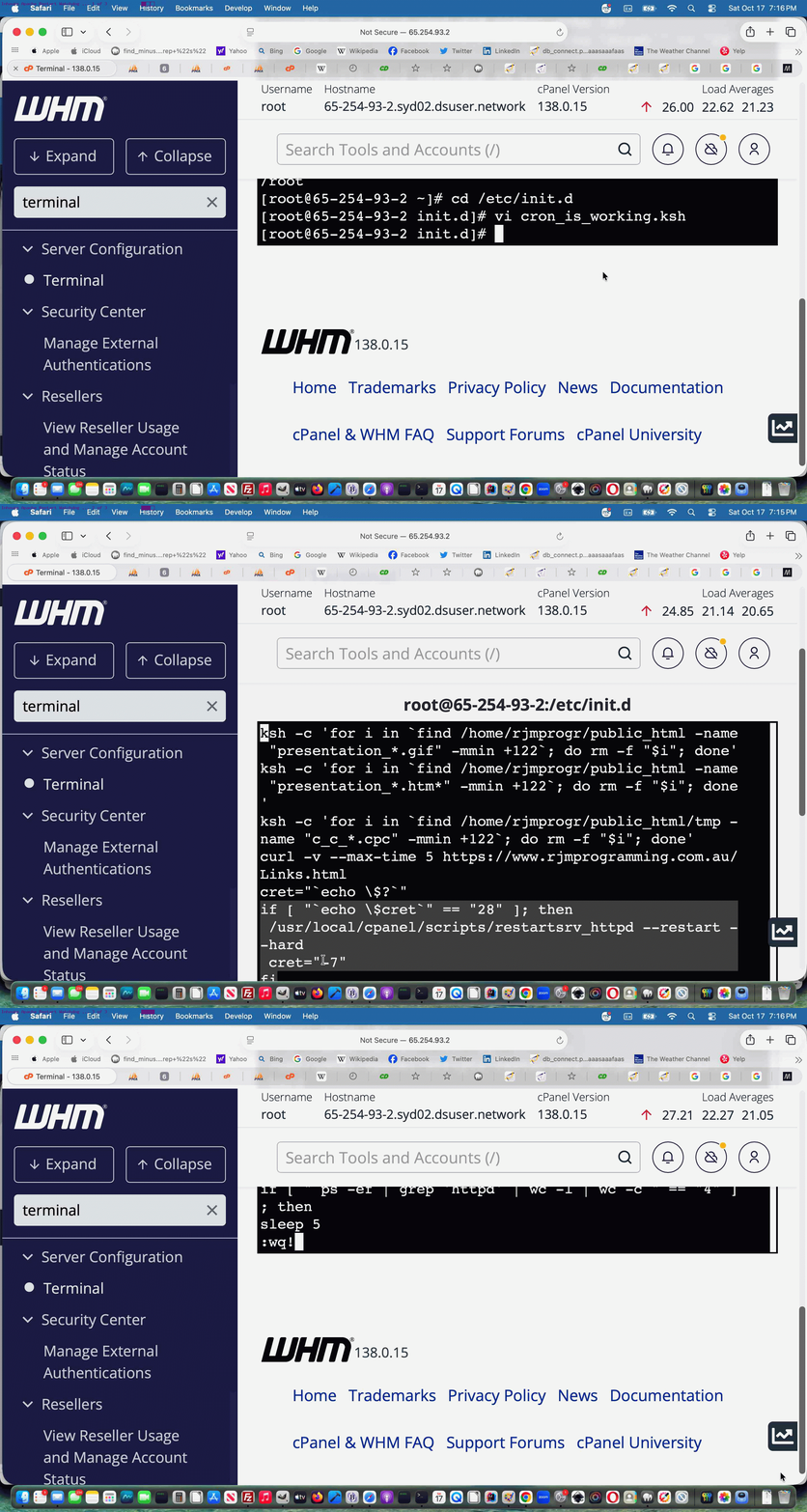
We’ve already developed an “inhouse watchdog” regarding crontab Korn Shell command line scripting means by which, under compromised MySql database conditions (when we last presented MySql Watchdog Migration Transition Solution Tutorial), we can perform the equivalent of …
WHM cPanel -> Restart Services -> Database Server
Today’s work uses that same crontab “every minute” Korn Shell …
* * * * * /etc/init.d/cron_is_working.ksh
… mentioned in Linux CentOS Web Server Domlogs Diskspace Automating Solution Tutorial inserting these Korn Shell scripting codelines …
curl -v --max-time 5 https://www.rjmprogramming.com.au/Links.html

cret="`echo \$?`"

if [ "`echo \$cret`" == "28" ]; then

 /usr/local/cpanel/scripts/restartsrv_httpd --restart --hard

 cret="-7"

fi
… to add to the “inhouse watchdog” smarts by, given an adverse website connection test, we can perform the equivalent of …
WHM cPanel -> Restart Services -> HTTP Server (Apache)
… both as a resurrection measure and a “buying us more time” measure to relax more working on “Performance enhancement” ideas into the future.
Regarding help here we got enormous help from …
… thanks.
Previous relevant PHP MySql WordPress Blog Performance PHP-FPM Configuration Tutorial is shown below.

PHP MySql WordPress Blog Performance PHP-FPM Configuration Tutorial
Moving on from yesterday’s PHP MySql WordPress Blog Performance Primer Tutorial‘s Performance monitoring theory 1 regarding our AlmaLinux Apache/PHP/MySql mainly WordPress.org blog, involving …
… and it pans out to log and monitor the PHP this way we got advice from on almalinux where is a log that would detect php performance issues? …
• PHP-FPM Slow Log: Captures backtraces of PHP scripts that exceed a defined time limit, helping pinpoint slow code or blocking functions.
• Default / Common Path: /var/log/php-fpm/www-slow.log (or /var/log/php8.x-fpm-slow.log depending on your PHP version)
• cPanel Path: /opt/cpanel/ea-phpXX/root/usr/var/log/php-fpm/error.log
… thanks … getting us to change the PHP-FPM configuration settings for the rjmprogramming.com.au domain specific PHP-FPM configuration settings in, for us, being in our WHM cPanel Terminal, going …
vi /opt/cpanel/ea-php81/root/etc/php-fpm.d/rjmprogramming.com.au.conf
… by appending …
request_slowlog_timeout = 5s

slowlog = /opt/cpanel/ea-php81/root/etc/php-fpm.d/www-slow.log
… and saving within the vi session, then in our WHM cPanel …
Restart Services -> HTTP Server (Apache)
… link click, and a Restart button click, to log to, for us start logging to …
/opt/cpanel/ea-php81/root/etc/php-fpm.d/www-slow.log
… pointing out to us two major pinchpoints exemplified by …
| Codex loop.php | WordPress error 404 event PHP |
|---|---|
| Overuse of file_get_contents | Rearrange use of file_get_contents … passing more work to crontab/curl overnight run |
… as two logging detection types of use to us, as we continue on our “Performance quest”.
Previous relevant PHP MySql WordPress Blog Performance Primer Tutorial is shown below.
PHP MySql WordPress Blog Performance Primer Tutorial
To our minds, when thinking about the performance of this blog, which we think could do with some attention given more traffic lately, it being an AlmaLinux Apache/PHP/MySql WordPress.org one, we know of four avenues of research we’d say are …
… the last of which we’ll leave to last, but some of that can be got to via WHM cPanel options.
With the first two, you will probably need to consider the information web server logging can provide you. By default, we’re finding, AlmaLinux Apache/PHP/MySql web servers of any recent times do not by default log for either of the first two above.
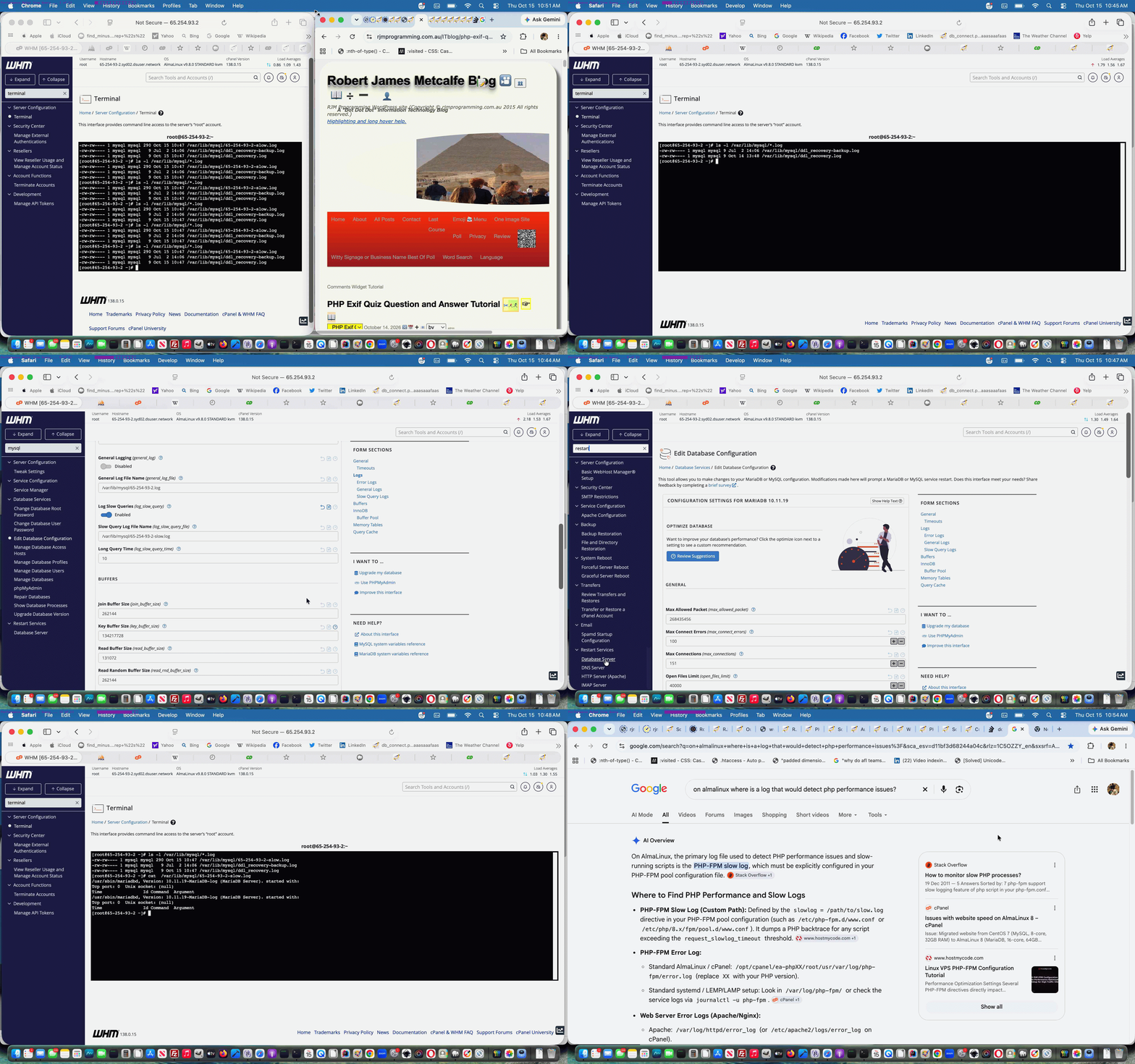
And so, today’s start down our road examining “performance”, we’ll outline how to set up logging to start investigating whether slow MySql database (further to PHP MySql Select Query UTF-8 Return Values Tutorial) queries are “too adversely” affecting your Apache/PHP/MySql web server’s creation of your (perhaps WordPress blog) webpage(s).
Here we got great advice from on almalinux where is a log that would detect slow mysql queries? … thanks … gleaning …
By default, MySQL’s slow query log is turned off on AlmaLinux. If it has been enabled, you can find the file path by running a quick SQL command, or you can configure it manually.
… leading us to …
ls -l /var/lib/mysql/*.log

cat  /var/lib/mysql/65-254-93-2-slow.log  # as relevant, in our RJM Programming domain's case, if above not showing zero length log
… and after a day of logging? We think this is not the major “performance” concern for our RJM Programming domain, that slow log still showing no issues. And so, tomorrow, the quest continues.
Previous relevant PHP MySql Select Query UTF-8 Return Values Tutorial is shown below.
PHP MySql Select Query UTF-8 Return Values Tutorial
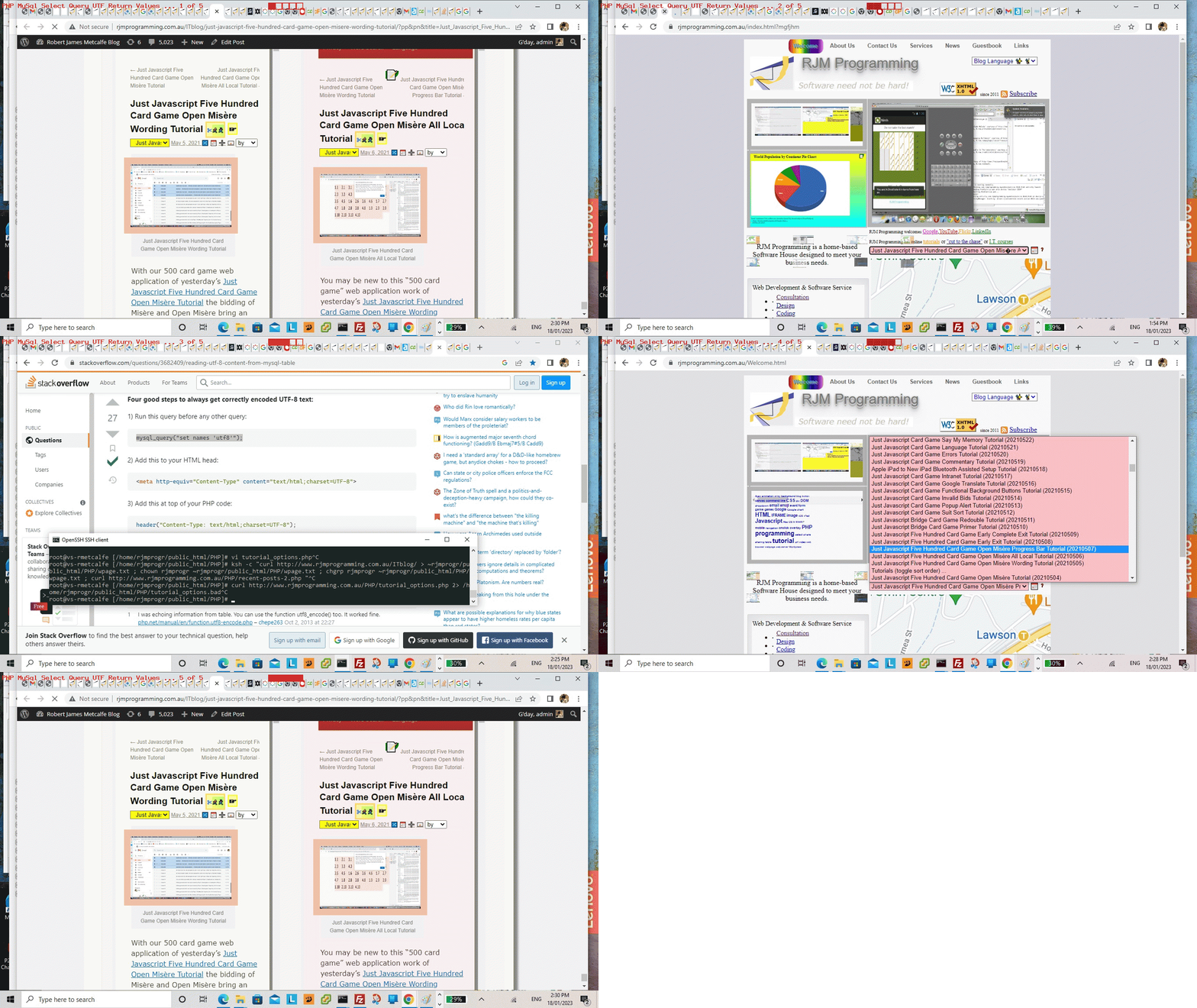
Yes, ever since embracing emojis, we’re on the lookout for gobbledegook. And yes, a lot of the strategies we found on the “stumbled upon” Reading UTF-8 Content from MySql Table we were familiar with, but one we weren’t, which was the one we discovered as gobbledegook in our Landing Page’s major dropdown outlining all the blog posts we’ve written at the RJM Programming WordPress Blog Website we’re running here, and you are reading now.
The, was …
Just Javascript Five Hundred Card Game Open Mis�re Progress Bar Tutorial (20210507)
… anti gobbledegook initiative scenario, with our changed tutorial_options.php cronatb/curl morning scheduled Landing Page modifier, becomes …
Just Javascript Five Hundred Card Game Open Misère Progress Bar Tutorial (20210507)
… improvement, came about from a consideration we have not thought about before … what about if MySql data contains UTF-8 data, and is part of a WordPress blog title, which ends up on the Landing Page big dropdown, already covered by a …
<meta http-equiv="Content-Type" content="text/html; charset=UTF-8">
… was inspired by checking off the excellent “already catered for” anti gobbledegook (emoji) checklist measures, leaving the PHP …
<?php
$res = mysql_query("set names 'utf8'");
?>
… initiative, before any SQL SELECT type queries, idea, presented at Reading UTF-8 Content from MySql Table, which fixed our issue very nicely, thanks, in our changed tutorial_options.php PHP crontab/curl PHP helper.
If this was interesting you may be interested in this too.
If this was interesting you may be interested in this too.
If this was interesting you may be interested in this too.
If this was interesting you may be interested in this too.
PHP MySql WordPress Blog Performance PHP-FPM Configuration Tutorial
Moving on from yesterday’s PHP MySql WordPress Blog Performance Primer Tutorial‘s Performance monitoring theory 1 regarding our AlmaLinux Apache/PHP/MySql mainly WordPress.org blog, involving …
… and it pans out to log and monitor the PHP this way we got advice from on almalinux where is a log that would detect php performance issues? …
• PHP-FPM Slow Log: Captures backtraces of PHP scripts that exceed a defined time limit, helping pinpoint slow code or blocking functions.
• Default / Common Path: /var/log/php-fpm/www-slow.log (or /var/log/php8.x-fpm-slow.log depending on your PHP version)
• cPanel Path: /opt/cpanel/ea-phpXX/root/usr/var/log/php-fpm/error.log
… thanks … getting us to change the PHP-FPM configuration settings for the rjmprogramming.com.au domain specific PHP-FPM configuration settings in, for us, being in our WHM cPanel Terminal, going …
vi /opt/cpanel/ea-php81/root/etc/php-fpm.d/rjmprogramming.com.au.conf
… by appending …
request_slowlog_timeout = 5s

slowlog = /opt/cpanel/ea-php81/root/etc/php-fpm.d/www-slow.log
… and saving within the vi session, then in our WHM cPanel …
Restart Services -> HTTP Server (Apache)
… link click, and a Restart button click, to log to, for us start logging to …
/opt/cpanel/ea-php81/root/etc/php-fpm.d/www-slow.log
… pointing out to us two major pinchpoints exemplified by …
| Codex loop.php | WordPress error 404 event PHP |
|---|---|
| Overuse of file_get_contents | Rearrange use of file_get_contents … passing more work to crontab/curl overnight run |
… as two logging detection types of use to us, as we continue on our “Performance quest”.
Previous relevant PHP MySql WordPress Blog Performance Primer Tutorial is shown below.
PHP MySql WordPress Blog Performance Primer Tutorial
To our minds, when thinking about the performance of this blog, which we think could do with some attention given more traffic lately, it being an AlmaLinux Apache/PHP/MySql WordPress.org one, we know of four avenues of research we’d say are …
… the last of which we’ll leave to last, but some of that can be got to via WHM cPanel options.
With the first two, you will probably need to consider the information web server logging can provide you. By default, we’re finding, AlmaLinux Apache/PHP/MySql web servers of any recent times do not by default log for either of the first two above.
And so, today’s start down our road examining “performance”, we’ll outline how to set up logging to start investigating whether slow MySql database (further to PHP MySql Select Query UTF-8 Return Values Tutorial) queries are “too adversely” affecting your Apache/PHP/MySql web server’s creation of your (perhaps WordPress blog) webpage(s).
Here we got great advice from on almalinux where is a log that would detect slow mysql queries? … thanks … gleaning …
By default, MySQL’s slow query log is turned off on AlmaLinux. If it has been enabled, you can find the file path by running a quick SQL command, or you can configure it manually.
… leading us to …
ls -l /var/lib/mysql/*.log

cat  /var/lib/mysql/65-254-93-2-slow.log  # as relevant, in our RJM Programming domain's case, if above not showing zero length log
… and after a day of logging? We think this is not the major “performance” concern for our RJM Programming domain, that slow log still showing no issues. And so, tomorrow, the quest continues.
Previous relevant PHP MySql Select Query UTF-8 Return Values Tutorial is shown below.
PHP MySql Select Query UTF-8 Return Values Tutorial
Yes, ever since embracing emojis, we’re on the lookout for gobbledegook. And yes, a lot of the strategies we found on the “stumbled upon” Reading UTF-8 Content from MySql Table we were familiar with, but one we weren’t, which was the one we discovered as gobbledegook in our Landing Page’s major dropdown outlining all the blog posts we’ve written at the RJM Programming WordPress Blog Website we’re running here, and you are reading now.
The, was …
Just Javascript Five Hundred Card Game Open Mis�re Progress Bar Tutorial (20210507)
… anti gobbledegook initiative scenario, with our changed tutorial_options.php cronatb/curl morning scheduled Landing Page modifier, becomes …
Just Javascript Five Hundred Card Game Open Misère Progress Bar Tutorial (20210507)
… improvement, came about from a consideration we have not thought about before … what about if MySql data contains UTF-8 data, and is part of a WordPress blog title, which ends up on the Landing Page big dropdown, already covered by a …
<meta http-equiv="Content-Type" content="text/html; charset=UTF-8">
… was inspired by checking off the excellent “already catered for” anti gobbledegook (emoji) checklist measures, leaving the PHP …
<?php
$res = mysql_query("set names 'utf8'");
?>
… initiative, before any SQL SELECT type queries, idea, presented at Reading UTF-8 Content from MySql Table, which fixed our issue very nicely, thanks, in our changed tutorial_options.php PHP crontab/curl PHP helper.
If this was interesting you may be interested in this too.
If this was interesting you may be interested in this too.
If this was interesting you may be interested in this too.
PHP MySql WordPress Blog Performance Primer Tutorial
To our minds, when thinking about the performance of this blog, which we think could do with some attention given more traffic lately, it being an AlmaLinux Apache/PHP/MySql WordPress.org one, we know of four avenues of research we’d say are …
… the last of which we’ll leave to last, but some of that can be got to via WHM cPanel options.
With the first two, you will probably need to consider the information web server logging can provide you. By default, we’re finding, AlmaLinux Apache/PHP/MySql web servers of any recent times do not by default log for either of the first two above.
And so, today’s start down our road examining “performance”, we’ll outline how to set up logging to start investigating whether slow MySql database (further to PHP MySql Select Query UTF-8 Return Values Tutorial) queries are “too adversely” affecting your Apache/PHP/MySql web server’s creation of your (perhaps WordPress blog) webpage(s).
Here we got great advice from on almalinux where is a log that would detect slow mysql queries? … thanks … gleaning …
By default, MySQL’s slow query log is turned off on AlmaLinux. If it has been enabled, you can find the file path by running a quick SQL command, or you can configure it manually.
… leading us to …
ls -l /var/lib/mysql/*.log

cat  /var/lib/mysql/65-254-93-2-slow.log  # as relevant, in our RJM Programming domain's case, if above not showing zero length log
… and after a day of logging? We think this is not the major “performance” concern for our RJM Programming domain, that slow log still showing no issues. And so, tomorrow, the quest continues.
Previous relevant PHP MySql Select Query UTF-8 Return Values Tutorial is shown below.
PHP MySql Select Query UTF-8 Return Values Tutorial
Yes, ever since embracing emojis, we’re on the lookout for gobbledegook. And yes, a lot of the strategies we found on the “stumbled upon” Reading UTF-8 Content from MySql Table we were familiar with, but one we weren’t, which was the one we discovered as gobbledegook in our Landing Page’s major dropdown outlining all the blog posts we’ve written at the RJM Programming WordPress Blog Website we’re running here, and you are reading now.
The, was …
Just Javascript Five Hundred Card Game Open Mis�re Progress Bar Tutorial (20210507)
… anti gobbledegook initiative scenario, with our changed tutorial_options.php cronatb/curl morning scheduled Landing Page modifier, becomes …
Just Javascript Five Hundred Card Game Open Misère Progress Bar Tutorial (20210507)
… improvement, came about from a consideration we have not thought about before … what about if MySql data contains UTF-8 data, and is part of a WordPress blog title, which ends up on the Landing Page big dropdown, already covered by a …
<meta http-equiv="Content-Type" content="text/html; charset=UTF-8">
… was inspired by checking off the excellent “already catered for” anti gobbledegook (emoji) checklist measures, leaving the PHP …
<?php
$res = mysql_query("set names 'utf8'");
?>
… initiative, before any SQL SELECT type queries, idea, presented at Reading UTF-8 Content from MySql Table, which fixed our issue very nicely, thanks, in our changed tutorial_options.php PHP crontab/curl PHP helper.
If this was interesting you may be interested in this too.
If this was interesting you may be interested in this too.

PHP Exif Quiz Text Variety Tutorial
Further to yesterday’s PHP Exif Quiz Question and Answer Tutorial, today we add variety …
<?php echo ”
  var cyclecnt=0;

  var dispmode=0;

  var diffxy=0;

  var origexwih='', newxwih='';

  var documenttitle='';


  function enat() {

    switch (dispmode) {

      case 0:

       document.getElementById('exw').style.color='black';

       break;


      case 1:

       document.getElementById('exw').style.color='transparent';

       break;


      case 2:

       document.getElementById('exw').style.color='black';

       document.getElementById('exw').style.textShadow='0px 1px purple';

       break;


      case 3:

       document.getElementById('exw').style.textShadow='none';

       break;


      case 4:

       if (document.getElementById('exw').getAttribute('data-was') != '') {

         document.getElementById('exw').innerHTML=newxwih;

         origexwih=newxwih;

       }

       break;


      case 5:

       if (eval(cyclecnt % 2) == 0 && document.getElementById('exw').getAttribute('data-was') != '') {

         document.getElementById('exw').innerHTML=origexwih;

       } else if (document.getElementById('exw').getAttribute('data-was') != '') {

         document.getElementById('exw').innerHTML=document.getElementById('exw').getAttribute('data-was');

       }

       break;


      case 6:

       document.getElementById('exw').style.fontStyle='normal';

       document.getElementById('exw').style.fontWeight='bolder';

       break;


      case 7:

       document.getElementById('exw').style.fontStyle='italic';

       document.getElementById('exw').style.fontWeight='bold';

       break;


      case 8:

       document.getElementById('exw').style.fontStyle='normal';

       document.getElementById('exw').style.fontWeight='normal';

       cyclecnt++;

       break;


      case 9:

       break;


      default:

       break;


    }

    dispmode++;

    dispmode=eval(dispmode % 9);

    setTimeout(enat, 8000);

   }
“; ?>
… to the right hand textual Exif information, including reducing to real numbers a lot of the “/” complexity, as a part of the choices, via …
<?php echo ”
   function analyzeit(wasihis) {

     var contentious='', newcontentious='', subcontentious='', precon='', extras='', paddi='';

     var thenewih=wasihis.replace(/\/1\,/g,',').replace(/\/1\&/g,'&').replace(/\/1\</g,'<');

     thenewih=thenewih.replace(/00\/100\&/g,'.00&').replace(/00\/100\,/g,'.00,').replace(/00\/100\</g,'.00<').replace(/([0-9][0-9])\/100\&/g,'.$1&').replace(/([0-9][0-9])\/100\,/g,'.$1,').replace(/([0-9][0-9])\/100\</g,'.$1<').replace(/0\/10\&/g,'.0&').replace(/1\/10\&/g,'.1&').replace(/2\/10\&/g,'.2&').replace(/3\/10\&/g,'.3&').replace(/4\/10\&/g,'.4&').replace(/5\/10\&/g,'.5&').replace(/6\/10\&/g,'.6&').replace(/7\/10\&/g,'.7&').replace(/8\/10\&/g,'.8&').replace(/9\/10\&/g,'.9&').replace(/0\/10\</g,'.0<').replace(/1\/10\</g,'.1<').replace(/2\/10\</g,'.2<').replace(/3\/10\</g,'.3<').replace(/4\/10\</g,'.4<').replace(/5\/10\</g,'.5<').replace(/6\/10\</g,'.6<').replace(/7\/10\</g,'.7<').replace(/8\/10\</g,'.8<').replace(/9\/10\</g,'.9<');

     var ufgs=thenewih.split(': ');

     var jbn=eval(-1 + ufgs.length);

     for (var ibn=jbn; ibn>1; ibn--) {

       contentious=ufgs[ibn].split('<br')[0].split('</span>')[0].split(String.fromCharCode(10))[0];

       if (contentious.indexOf('</spJUNKan>') == -1 && contentious.indexOf('/') != -1 && contentious.replace(/[A-Z]|[a-z]\//g,' /').indexOf(' /') == -1) {

         extras='';

         paddi='';

         if (ufgs[ibn].indexOf('<span') == 0) {

         extras='<span' + ufgs[ibn].split('<span')[1].split('>')[0] + '>';

         newcontentious=contentious.substring(eval('' + extras.length));

         } else {

         newcontentious=contentious;

         }

         if (precon == '') {

         precon=ufgs[eval(-1 + ibn)].split(' ')[eval(-1 + ufgs[eval(-1 + ibn)].split(' ').length)] + ': ' + extras;

         }

         documenttitle+=' ConTentious=' + contentious + ' ... ';

         //alert(precon + contentious);

         documenttitle+=' newconTentious=' + newcontentious + ' ... ';

         while (newcontentious.replace(/\<\//g,'').indexOf('/') != -1) {

           subcontentious=newcontentious.split('<br>')[0].split('</span>')[0].split(',')[eval(-1 + newcontentious.split('<br>')[0].split('</span>')[0].split(',').length)];

           subcontentious=subcontentious.split(' ')[eval(-1 + subcontentious.split(' ').length)];

           subcontentious=subcontentious.split(',')[0];

           if (newcontentious.indexOf('<br>' + subcontentious) != -1) {

           newcontentious=newcontentious.replace('<br>' + subcontentious, '<br>' + eval('' + subcontentious));

           } else if (newcontentious.indexOf(',' + subcontentious) != -1) {

           newcontentious=newcontentious.replace(',' + subcontentious, '<br>' + eval('' + subcontentious));

           } else {

           newcontentious=newcontentious.replace(subcontentious, '' + eval('' + subcontentious));

           }

         documenttitle+=' Newcontentious=' + newcontentious + ' ... ';

         //alert('newcontentious=' + newcontentious);

         }

         if (thenewih.indexOf(precon + contentious) == -1) {

         thenewih=thenewih.replace(precon + contentious, precon + (extras == '' ? '<span>' : '') + newcontentious.replace(/\<br\>/g,',') + (extras == '' ? '</span>' : ''));

         precon+=(extras == '' ? '<span>' : '') +  + newcontentious.replace(/\<br\>/g,',') + (extras == '' ? '</span>' : '') + ',';

         } else {

         thenewih=thenewih.replace(contentious, '<span>' + newcontentious.replace(/\<br\>/g,',') + (extras == '' ? '</span>' : ''));

         }

         precon='';

         documenttitle+=newcontentious.replace(/\<br\>/g,',') + ' via ' + paddi + contentious;

         paddi+=' ';

         ufgs=thenewih.split(': ');

       }

     }

     if (thenewih != wasihis) {

       documenttitle+=' ... end ';

       document.getElementById('exw').setAttribute('data-was', wasihis);

       //alert(675);

       documenttitle='';

     }

     return thenewih;

   }
?>
“; ?>
… in the changed PHP read_exif_off_image_rotate.php helping out the Scenery Geolocation Quiz web application.
Previous relevant PHP Exif Quiz Question and Answer Tutorial is shown below.
PHP Exif Quiz Question and Answer Tutorial
Regarding yesterday’s PHP Exif Quiz Geographicals Tutorial‘s Scenery Geolocation Quiz web application there were the image numbers which amounted to “unsuitable for Exif” purposes, which we negated, for us to consider, where to do nothing we deemed less ideal than to …
  var qs=["What is the tallest mountain on the South Island (and all of New Zealand)?",

  "What is the largest lake located on the South Island?",

  "In what year were the North Island and South Island officially named?",

  "Which famous historic church sits on the edge of Lake Tekapo?",

  "Which body of water separates the South Island from Stewart Island?",

  "What famous steamship cruises across Lake Wakatipu in Queenstown?",

  "Which limestone rock formations are a major tourist stop on the West Coast?",

  "What words could describe the character of the kea bird?",

  "What weight of wool in kilograms was Shrek as he exited the cave near Bendigo Station in 2004?",

  "What varietal of wine is grown in Central Otago?",

  "Is Cromwell's Big Fruit larger than Robertson's Big Potato?",

  "Is Lake Wanaka deeper than Sydney Harbour?",

  "Is Clutha River deeper than Sydney Harbour?",

  "What is the Māori name for New Zealand greenstone?",

  "In which river of the 1860s Otago gold rush was most gold found?",

  "Does New Zealand have a longer coastline than China?",

  "What sport do the All Whites play?",

  "What year were the All Blacks rugby team last beaten at Eden Park, here in October, 2026?",

  "If 73.6 million people, as of October 2026, live between latitude 45°N and 46°N how many million to nearest whole number live between latitude 45°S and 90°S?"];
  function quizimgid(divo) {

   var thisq=Math.floor(Math.random() * qs.length), wdsleft=0, ii=0, jj=0;

   if (divo.innerHTML.indexOf('-') == 0) {

   var ansis=prompt(qs[thisq], '');

   if (ansis == null) { ansis=''; }

   var wdsare=as[thisq].split(',')[0].split('(')[0].trim().replace(' / ',' ').replace(' at ',' ').toLowerCase().split(' ');

   wdsleft=wdsare.length;

   if (ansis.trim() != '') {

   var qansare=ansis.toLowerCase().split(' ');

   for (ii=0; ii<eval('' + qansare.length); ii++) {

     for (jj=0; jj<eval('' + wdsare.length); jj++) {

        if (wdsare[jj] == qansare[ii]) { wdsleft--;  }

     }

   }

   }

   if (wdsleft > 0) {

     forans=" <font size=1>(for answer " + as[thisq] + ")</font>";

   } else {

     forans=" <font size=6>(Congratulations!!)</font>";

   }

   document.getElementById('myh1').title='' + wdsleft;

   } else {

   divo.style.backgroundImage='url(//www.rjmprogramming.com.au/NZ/IMG_' + divo.innerHTML + '.jpeG)';

   divo.style.backgroundSize='contain';

   divo.style.backgroundRepeat='no-repeat';

   if (woo) {

     if (!woo.closed) {

       woo.close();

       woo=null;

     }

   }

   woo=window.open('//www.rjmprogramming.com.au/PHP/read_exif_off_image_rotate.php?image=http://www.rjmprogramming.com.au/NZ/IMG_' + divo.innerHTML + '.jpeG', '_blank', 'top=100,left=' + eval(-800 + screen.width) + ',width=800,height=800');

   }

  }
… as our way to add some variety to the quiz via a changed grid_fitting_in.html also shown below.
Previous relevant PHP Exif Quiz Geographicals Tutorial is shown below.
PHP Exif Quiz Geographicals Tutorial
Yesterday’s PHP Exif Quiz Tutorial‘s Scenery Geolocation Quiz, as far as follow up “Geographicals Based Interfacings” went, offered …
… off which, it being “inhouse”, a click/tap offers other “Geographicals” (ie. latitude, longitude) based interfacing options … via …
Previous relevant PHP Exif Quiz Tutorial is shown below.
PHP Exif Quiz Tutorial
You guessed it? After yesterday’s …
… we’d be coming up with a …
Yay!!!!!!!!!!!!!!!!
Click here to see what we mean …
Did you know?
Regarding testing PHP web applications, especially up at our public RJM Programming website (more so because newer versions of AlmaLinux Apache/PHP/MySql configurations will drop some of the PHP modules you have previously (re-)installed, and you have to keep, at least for us, “stumbling onto” the issue), you can occasionally encounter …
HTTP Error Code 500 … Internal Error
… issues, as we did at one stage deploying the Scenery Geolocation Quiz above.
To both research the problem, and fix it we access the public RJM Programming AlmaLinux Apache/PHP/MySql website’s WHM cPanel environment’s web server command line accessing Terminal option, going …
Previous relevant PHP Exif Retention off iPhone Images Tutorial is shown below.
PHP Exif Retention off iPhone Images Tutorial
We have a new project on the go. We want to retain Exif information, that is contained within our iPhone’s *.HEIC formatted photographs, all the way through to some format and form of RJM Programming public website set of image media files.
And so, as well as referencing previous work such as that of PHP Exif Image Information Revisit Tutorial and Command Line ImageMagick HEIC to JPEG Image Creation Tutorial, we asked of Google retaining exif information of iPhone images all the way to uploading via filezilla to a web server, finding pertinent and useful the advice …
To retain EXIF data from an iPhone all the way to a web server via FileZilla, you must bypass mobile browser compression and ensure lossless transfer protocols.
AirDrop or Cable Transfer: Transfer the file from the Files app or Photos library to a Mac or PC using AirDrop or a direct USB cable.
And so, that is today’s first step on the new project, where if we cannot retain Exif the project is not worth continuing with.
Keep your hair on! It worked using our ImageMagick conversions to *.jpeG (from iPhone AirDropped *.HEIC) here on this MacBook Air and FileZilla (sftp) uploading those to our new folder on the RJM Programming web server for images like …
… as one example.
Previous relevant PHP Exif Image Information Revisit Tutorial is shown below.
PHP Exif Image Information Revisit Tutorial
Another “revisit” today to the PHP Exif Information web application displayer of PHP Exif Image Zip Mystery Game Hints Tutorial. Now supposing we put this scenario to you …
Now we ask you, in PHP, do you need to know the dimensions of that image to satisfy the requirements above? Well, we first thought (surely it must be) so, but going through the motions of doing today’s work, we realized that, though you can (for the PHP global $image variable with the image URL) …
list($width, $height, $type, $attr) = getimagesize($image);
… in PHP to determine those image dimensions, with the way our web application works, we didn’t need to, as you can “link” PHP with the CSS calc function to bypass any Javascript (eg. DOM) client script approach, abstracting the need to know hard and fast dimensions in PHP (and consequently not running into any window resizing or zooming issues (as a matter of fact, zooming up can make the Exif text information resize up quite nicely thank you very much and don’t mind if I do but we digress and so and usefully))
if ($image != "") {

  list($width, $height, $type, $attr) = getimagesize($image);

  // $iwidth=$width;

  // $iheight=$height;

  // $csswh=" width:" . $iwidth . "px; height:" . $iheight . "px; ";

  $csswh=" width: calc(100% - 10px); height: calc(100% - 220px); text-align: right; margin-right: 20px;  } form { position: absolute; left:50px; top: calc(100% - 45px); width:100%; height:40px; ";

}
… used later on to build up the HTML for the webpage, that also looks much better because the image and Exif wording are more likely to be separated from each other now …
$htmlis="<html><head>" . $javascript . "<style>" . $bcsscolour . " div { font-size:9px; overflow: visible; float:right; " . $csswh . " } </style><meta name='viewport' content='width=device-width, initial-scale=1, minimum-scale=0.25, maximum-scale=8, user-scalable=yes'><title>Exif for " . $image . "</title></head><body style='background-color:" . $bcolour . ";'><h1 id='myh1'>Exif <select onchange=\"if (this.value.length == 2) { top.alinktop=''; top.document.getElementById('dexif').innerHTML=''; top.location.href=top.document.URL.split('index.')[0]+'index-ssmhalf.html'; } else { var zipurl=prompt('Enter image zipfile URL for Mystery Trip game (good for 2 players)','mysterytrip.zip'); if (zipurl != null) { if (zipurl.toLowerCase().indexOf('.zip') != -1) { location.href=document.URL.split('#')[0].split('?')[0] + '?image=' + encodeURIComponent(zipurl); } } } \"><option value=''>for</option><option value=' '>zipfile</option>" . $anotheroption . "</select> " . $image . "</h1><h3>RJM Programming - August, 2016 <a id='ageolocation style='visibility:hidden;' href='#mygeolocation'>Geolocation Context for Photograph" . $various . "</a></h3><h4>Thanks to <a target=_blank title=Useful href=//www.v-nessa.net/2010/08/02/using-php-to-extract-image-exif-data>http://www.v-nessa.net/2010/08/02/using-php-to-extract-image-exif-data</a></h4><div onclick=\"window.open('" . $image . "','_blank','top=5,left=5');\" style='background-color:yellow; background: url(" . str_replace("/Applications/MAMP/htdocs/","http://localhost:8888/",$image) . ") no-repeat; background-position: 5px; background-size: contain; '><br>" . " Image type of " . $image . " is: " . $types[$imagetype];
The changed PHP read_exif_off_image_rotate.php includes these aesthetic and usability improvements you can test for yourself at this live run link.
Previous relevant PHP Exif Image Zip Mystery Game Hints Tutorial is shown below.
PHP Exif Image Zip Mystery Game Hints Tutorial
Just like with the recent PHP Wikipedia Geo Map Google Chart Tutorial we find a use for the talents of Google Chart …
… as we improve the functionality of our “Mystery Trip in Images Game” we started with yesterday’s PHP Exif Image Zip Mystery Game Primer Tutorial.
They are used respectively for …
And so today we can take you to a real zip file of JPEG images of a Mystery Trip, taken on an iPhone that you can try with a second player at this live run link.
The photos were taken deliberately to be obtuse, so as not to give the game away with their visual content. How are we able to give you hints in a programmatical sense? Well, on a JPEG coming out of an iPhone there is geodata (metadata latitude and longitude) stored that we access via Exif image attribute (PHP) methods.
The changed PHP read_exif_off_image_rotate.php includes these “best for two player” game interactive improvements, as well as allowing the user be able to reach this Mystery Game from old URL (simpler) arrangements, from older incarnations (you can read below).
Previous relevant PHP Exif Image Zip Mystery Game Primer Tutorial is shown below.
PHP Exif Image Zip Mystery Game Primer Tutorial
There’s a fair bit to the design of a new game we’re developing that uses the image metadata ideas from PHP Exif Image Information Rotation Tutorial in its workings.
Our early days work starts down the road by collecting zipfile and other pertinent Exif data item ideas off …
As you can see to simplify things we are introducing PHP zipfile coding to group together a set of photographs into the one file concept.
It will be tomorrow that you see a more complete and rounded game solution, and by then we can come up with a name for it too!
Feel free to try the changed read_exif_off_image_rotate.php live run to try out this game in an early incarnation.
Previous relevant PHP Exif Image Information Rotation Tutorial is shown below.
PHP Exif Image Information Rotation Tutorial
The “Stop Press” of PHP Exif Image Information Primer Tutorial as shown below, introduced us to some PHP able to glean quite a bit of really useful Exif information stored with an image file, perhaps straight off a digital camera or mobile phone or mobile tablet. We use the great advice of http://www.v-nessa.net/2010/08/02/using-php-to-extract-image-exif-data to cycle through this information.
This information was of interest regarding …
Sometimes you’ll see Gimp using exif functionality when it becomes aware of the possibility your image could be rotated to advantage
… as we saw Gimp doing this in relation to a photograph image coming off my Android Mobile Phone that we used, in its “rotated-by-Gimp” form, in our recent Mindfulness Follow Up Tutorial. But how about if we want to detect what Gimp detects, to fix this camera orientation issue ourselves? Well, in amongst the Exif information, we found …
IFD0.Orientation: 6 … and then surfing the web we found …… which gave us the means to apply a rotation the way Gimp does. How did we decide to apply this rotation? There are lots of ways, and we decided on this occasion to use CSS and apply a background image, with a transformation, to an HTML div element, also showing all that Exif information. We do this with new PHP you could call read_exif_off_image_rotate.php that has this corresponding new live run link. To get there, from where we’ve last been, take a skeg here.
So, coming back to our “clouds” photo we saw an Exif IFD0.Orientation value of 6 and consulted this useful link to find that we should rotate the image by 90 degrees. We do this with the HTML and inline CSS that goes, for the encasing HTML div element …
<div style='background-color:yellow; background: url(clouds.jpg); opacity:0.6;  norepeat; -webkit-transform: rotate(90deg); -moz-transform: rotate(90deg); -ms-transform: rotate(90deg); -o-transform: rotate(90deg); transform: rotate(90deg); '>

</div>
… in regard to using the original camera image …
Now you may have heard of geographical knowledge stored within photographs, and perhaps you’ll see the live run‘s (turn your head or computer) …
GPS.GPSVersion
… that if fleshed out, with other data elements underneath, would put that image into the category of those where geographical information resides. You may want to start reading more about (the huge topic of) “Geotagging” from this useful Wikipedia webpage … thanks.
Previous relevant PHP Exif Image Information Primer Tutorial is shown below.
PHP Exif Image Information Primer Tutorial
Our (Mac OS X laptop) local MAMP web server is an Apache/PHP/MySql web server. In this environment you can find out a lot with some PHP code as per …
<?php phpinfo(); ?>
… and if, in doing this, you find a reference to the “exif” Exchangeable Image Information functionality existing, you are a lucky candidate to introduce some image “interrogation” (but not this) logic to your PHP code.
We followed a lot of the advice of the very useful link (thanks) to create some PHP called …
… where we may (or maybe not) be waking you up (before we go go ‘Cause I’m not plannin’ on going solo yo (to be honest, like)) … it’s a slow news day … to the fact that images can show on a web page but may not be all you would understand them to be … shock, horror!
Yes, an image that is a GIF in all but name will often display fine even if it’s been given a name like MyNameIs.Jpeg man person.
If this outrage makes you …
… then we’re here to tell you that you need to take a Bex and have a lie down.
In any case, there is a solution to this in PHP if the exif functionality is available to you, and this matter is of concern, and you can see us showing you how to test for that with the code above and this live run. Sometimes you’ll see Gimp using exif functionality when it becomes aware of the possibility your image could be rotated to advantage … we’ve had this happen and thanked Gimp with more than the usual toast and herbal tea offerings you’d be used to giving … we take it?!
Stop Press
As of 8/8/2016 (well, what do you know? … understood everywhere!?) we’re revisiting Exif and PHP to learn more and our tutorial picture now reflects the early days of the revisit and the new resultant PHP we wrote, that you could call read_exif_off_image.php, inspired, largely from http://www.v-nessa.net/2010/08/02/using-php-to-extract-image-exif-data (thanks), and has this live run link, the output of which is pointed to by the red arrow in the tutorial picture.
If this was interesting you may be interested in this too.
If this was interesting you may be interested in this too.
If this was interesting you may be interested in this too.
If this was interesting you may be interested in this too.
If this was interesting you may be interested in this too.
If this was interesting you may be interested in this too.
If this was interesting you may be interested in this too.
If this was interesting you may be interested in this too.
If this was interesting you may be interested in this too.
If this was interesting you may be interested in this too.
PHP Exif Quiz Question and Answer Tutorial
Regarding yesterday’s PHP Exif Quiz Geographicals Tutorial‘s Scenery Geolocation Quiz web application there were the image numbers which amounted to “unsuitable for Exif” purposes, which we negated, for us to consider, where to do nothing we deemed less ideal than to …
  var qs=["What is the tallest mountain on the South Island (and all of New Zealand)?",

  "What is the largest lake located on the South Island?",

  "In what year were the North Island and South Island officially named?",

  "Which famous historic church sits on the edge of Lake Tekapo?",

  "Which body of water separates the South Island from Stewart Island?",

  "What famous steamship cruises across Lake Wakatipu in Queenstown?",

  "Which limestone rock formations are a major tourist stop on the West Coast?",

  "What words could describe the character of the kea bird?",

  "What weight of wool in kilograms was Shrek as he exited the cave near Bendigo Station in 2004?",

  "What varietal of wine is grown in Central Otago?",

  "Is Cromwell's Big Fruit larger than Robertson's Big Potato?",

  "Is Lake Wanaka deeper than Sydney Harbour?",

  "Is Clutha River deeper than Sydney Harbour?",

  "What is the Māori name for New Zealand greenstone?",

  "In which river of the 1860s Otago gold rush was most gold found?",

  "Does New Zealand have a longer coastline than China?",

  "What sport do the All Whites play?",

  "What year were the All Blacks rugby team last beaten at Eden Park, here in October, 2026?",

  "If 73.6 million people, as of October 2026, live between latitude 45°N and 46°N how many million to nearest whole number live between latitude 45°S and 90°S?"];
  function quizimgid(divo) {

   var thisq=Math.floor(Math.random() * qs.length), wdsleft=0, ii=0, jj=0;

   if (divo.innerHTML.indexOf('-') == 0) {

   var ansis=prompt(qs[thisq], '');

   if (ansis == null) { ansis=''; }

   var wdsare=as[thisq].split(',')[0].split('(')[0].trim().replace(' / ',' ').replace(' at ',' ').toLowerCase().split(' ');

   wdsleft=wdsare.length;

   if (ansis.trim() != '') {

   var qansare=ansis.toLowerCase().split(' ');

   for (ii=0; ii<eval('' + qansare.length); ii++) {

     for (jj=0; jj<eval('' + wdsare.length); jj++) {

        if (wdsare[jj] == qansare[ii]) { wdsleft--;  }

     }

   }

   }

   if (wdsleft > 0) {

     forans=" <font size=1>(for answer " + as[thisq] + ")</font>";

   } else {

     forans=" <font size=6>(Congratulations!!)</font>";

   }

   document.getElementById('myh1').title='' + wdsleft;

   } else {

   divo.style.backgroundImage='url(//www.rjmprogramming.com.au/NZ/IMG_' + divo.innerHTML + '.jpeG)';

   divo.style.backgroundSize='contain';

   divo.style.backgroundRepeat='no-repeat';

   if (woo) {

     if (!woo.closed) {

       woo.close();

       woo=null;

     }

   }

   woo=window.open('//www.rjmprogramming.com.au/PHP/read_exif_off_image_rotate.php?image=http://www.rjmprogramming.com.au/NZ/IMG_' + divo.innerHTML + '.jpeG', '_blank', 'top=100,left=' + eval(-800 + screen.width) + ',width=800,height=800');

   }

  }
… as our way to add some variety to the quiz via a changed grid_fitting_in.html also shown below.
Previous relevant PHP Exif Quiz Geographicals Tutorial is shown below.
PHP Exif Quiz Geographicals Tutorial
Yesterday’s PHP Exif Quiz Tutorial‘s Scenery Geolocation Quiz, as far as follow up “Geographicals Based Interfacings” went, offered …
… off which, it being “inhouse”, a click/tap offers other “Geographicals” (ie. latitude, longitude) based interfacing options … via …
Previous relevant PHP Exif Quiz Tutorial is shown below.
PHP Exif Quiz Tutorial
You guessed it? After yesterday’s …
… we’d be coming up with a …
Yay!!!!!!!!!!!!!!!!
Click here to see what we mean …
Did you know?
Regarding testing PHP web applications, especially up at our public RJM Programming website (more so because newer versions of AlmaLinux Apache/PHP/MySql configurations will drop some of the PHP modules you have previously (re-)installed, and you have to keep, at least for us, “stumbling onto” the issue), you can occasionally encounter …
HTTP Error Code 500 … Internal Error
… issues, as we did at one stage deploying the Scenery Geolocation Quiz above.
To both research the problem, and fix it we access the public RJM Programming AlmaLinux Apache/PHP/MySql website’s WHM cPanel environment’s web server command line accessing Terminal option, going …
Previous relevant PHP Exif Retention off iPhone Images Tutorial is shown below.
PHP Exif Retention off iPhone Images Tutorial
We have a new project on the go. We want to retain Exif information, that is contained within our iPhone’s *.HEIC formatted photographs, all the way through to some format and form of RJM Programming public website set of image media files.
And so, as well as referencing previous work such as that of PHP Exif Image Information Revisit Tutorial and Command Line ImageMagick HEIC to JPEG Image Creation Tutorial, we asked of Google retaining exif information of iPhone images all the way to uploading via filezilla to a web server, finding pertinent and useful the advice …
To retain EXIF data from an iPhone all the way to a web server via FileZilla, you must bypass mobile browser compression and ensure lossless transfer protocols.
AirDrop or Cable Transfer: Transfer the file from the Files app or Photos library to a Mac or PC using AirDrop or a direct USB cable.
And so, that is today’s first step on the new project, where if we cannot retain Exif the project is not worth continuing with.
Keep your hair on! It worked using our ImageMagick conversions to *.jpeG (from iPhone AirDropped *.HEIC) here on this MacBook Air and FileZilla (sftp) uploading those to our new folder on the RJM Programming web server for images like …
… as one example.
Previous relevant PHP Exif Image Information Revisit Tutorial is shown below.
PHP Exif Image Information Revisit Tutorial
Another “revisit” today to the PHP Exif Information web application displayer of PHP Exif Image Zip Mystery Game Hints Tutorial. Now supposing we put this scenario to you …
Now we ask you, in PHP, do you need to know the dimensions of that image to satisfy the requirements above? Well, we first thought (surely it must be) so, but going through the motions of doing today’s work, we realized that, though you can (for the PHP global $image variable with the image URL) …
list($width, $height, $type, $attr) = getimagesize($image);
… in PHP to determine those image dimensions, with the way our web application works, we didn’t need to, as you can “link” PHP with the CSS calc function to bypass any Javascript (eg. DOM) client script approach, abstracting the need to know hard and fast dimensions in PHP (and consequently not running into any window resizing or zooming issues (as a matter of fact, zooming up can make the Exif text information resize up quite nicely thank you very much and don’t mind if I do but we digress and so and usefully))
if ($image != "") {

  list($width, $height, $type, $attr) = getimagesize($image);

  // $iwidth=$width;

  // $iheight=$height;

  // $csswh=" width:" . $iwidth . "px; height:" . $iheight . "px; ";

  $csswh=" width: calc(100% - 10px); height: calc(100% - 220px); text-align: right; margin-right: 20px;  } form { position: absolute; left:50px; top: calc(100% - 45px); width:100%; height:40px; ";

}
… used later on to build up the HTML for the webpage, that also looks much better because the image and Exif wording are more likely to be separated from each other now …
$htmlis="<html><head>" . $javascript . "<style>" . $bcsscolour . " div { font-size:9px; overflow: visible; float:right; " . $csswh . " } </style><meta name='viewport' content='width=device-width, initial-scale=1, minimum-scale=0.25, maximum-scale=8, user-scalable=yes'><title>Exif for " . $image . "</title></head><body style='background-color:" . $bcolour . ";'><h1 id='myh1'>Exif <select onchange=\"if (this.value.length == 2) { top.alinktop=''; top.document.getElementById('dexif').innerHTML=''; top.location.href=top.document.URL.split('index.')[0]+'index-ssmhalf.html'; } else { var zipurl=prompt('Enter image zipfile URL for Mystery Trip game (good for 2 players)','mysterytrip.zip'); if (zipurl != null) { if (zipurl.toLowerCase().indexOf('.zip') != -1) { location.href=document.URL.split('#')[0].split('?')[0] + '?image=' + encodeURIComponent(zipurl); } } } \"><option value=''>for</option><option value=' '>zipfile</option>" . $anotheroption . "</select> " . $image . "</h1><h3>RJM Programming - August, 2016 <a id='ageolocation style='visibility:hidden;' href='#mygeolocation'>Geolocation Context for Photograph" . $various . "</a></h3><h4>Thanks to <a target=_blank title=Useful href=//www.v-nessa.net/2010/08/02/using-php-to-extract-image-exif-data>http://www.v-nessa.net/2010/08/02/using-php-to-extract-image-exif-data</a></h4><div onclick=\"window.open('" . $image . "','_blank','top=5,left=5');\" style='background-color:yellow; background: url(" . str_replace("/Applications/MAMP/htdocs/","http://localhost:8888/",$image) . ") no-repeat; background-position: 5px; background-size: contain; '><br>" . " Image type of " . $image . " is: " . $types[$imagetype];
The changed PHP read_exif_off_image_rotate.php includes these aesthetic and usability improvements you can test for yourself at this live run link.
Previous relevant PHP Exif Image Zip Mystery Game Hints Tutorial is shown below.
PHP Exif Image Zip Mystery Game Hints Tutorial
Just like with the recent PHP Wikipedia Geo Map Google Chart Tutorial we find a use for the talents of Google Chart …
… as we improve the functionality of our “Mystery Trip in Images Game” we started with yesterday’s PHP Exif Image Zip Mystery Game Primer Tutorial.
They are used respectively for …
And so today we can take you to a real zip file of JPEG images of a Mystery Trip, taken on an iPhone that you can try with a second player at this live run link.
The photos were taken deliberately to be obtuse, so as not to give the game away with their visual content. How are we able to give you hints in a programmatical sense? Well, on a JPEG coming out of an iPhone there is geodata (metadata latitude and longitude) stored that we access via Exif image attribute (PHP) methods.
The changed PHP read_exif_off_image_rotate.php includes these “best for two player” game interactive improvements, as well as allowing the user be able to reach this Mystery Game from old URL (simpler) arrangements, from older incarnations (you can read below).
Previous relevant PHP Exif Image Zip Mystery Game Primer Tutorial is shown below.
PHP Exif Image Zip Mystery Game Primer Tutorial
There’s a fair bit to the design of a new game we’re developing that uses the image metadata ideas from PHP Exif Image Information Rotation Tutorial in its workings.
Our early days work starts down the road by collecting zipfile and other pertinent Exif data item ideas off …
As you can see to simplify things we are introducing PHP zipfile coding to group together a set of photographs into the one file concept.
It will be tomorrow that you see a more complete and rounded game solution, and by then we can come up with a name for it too!
Feel free to try the changed read_exif_off_image_rotate.php live run to try out this game in an early incarnation.
Previous relevant PHP Exif Image Information Rotation Tutorial is shown below.
PHP Exif Image Information Rotation Tutorial
The “Stop Press” of PHP Exif Image Information Primer Tutorial as shown below, introduced us to some PHP able to glean quite a bit of really useful Exif information stored with an image file, perhaps straight off a digital camera or mobile phone or mobile tablet. We use the great advice of http://www.v-nessa.net/2010/08/02/using-php-to-extract-image-exif-data to cycle through this information.
This information was of interest regarding …
Sometimes you’ll see Gimp using exif functionality when it becomes aware of the possibility your image could be rotated to advantage
… as we saw Gimp doing this in relation to a photograph image coming off my Android Mobile Phone that we used, in its “rotated-by-Gimp” form, in our recent Mindfulness Follow Up Tutorial. But how about if we want to detect what Gimp detects, to fix this camera orientation issue ourselves? Well, in amongst the Exif information, we found …
IFD0.Orientation: 6 … and then surfing the web we found …… which gave us the means to apply a rotation the way Gimp does. How did we decide to apply this rotation? There are lots of ways, and we decided on this occasion to use CSS and apply a background image, with a transformation, to an HTML div element, also showing all that Exif information. We do this with new PHP you could call read_exif_off_image_rotate.php that has this corresponding new live run link. To get there, from where we’ve last been, take a skeg here.
So, coming back to our “clouds” photo we saw an Exif IFD0.Orientation value of 6 and consulted this useful link to find that we should rotate the image by 90 degrees. We do this with the HTML and inline CSS that goes, for the encasing HTML div element …
<div style='background-color:yellow; background: url(clouds.jpg); opacity:0.6;  norepeat; -webkit-transform: rotate(90deg); -moz-transform: rotate(90deg); -ms-transform: rotate(90deg); -o-transform: rotate(90deg); transform: rotate(90deg); '>

</div>
… in regard to using the original camera image …
Now you may have heard of geographical knowledge stored within photographs, and perhaps you’ll see the live run‘s (turn your head or computer) …
GPS.GPSVersion
… that if fleshed out, with other data elements underneath, would put that image into the category of those where geographical information resides. You may want to start reading more about (the huge topic of) “Geotagging” from this useful Wikipedia webpage … thanks.
Previous relevant PHP Exif Image Information Primer Tutorial is shown below.
PHP Exif Image Information Primer Tutorial
Our (Mac OS X laptop) local MAMP web server is an Apache/PHP/MySql web server. In this environment you can find out a lot with some PHP code as per …
<?php phpinfo(); ?>
… and if, in doing this, you find a reference to the “exif” Exchangeable Image Information functionality existing, you are a lucky candidate to introduce some image “interrogation” (but not this) logic to your PHP code.
We followed a lot of the advice of the very useful link (thanks) to create some PHP called …
… where we may (or maybe not) be waking you up (before we go go ‘Cause I’m not plannin’ on going solo yo (to be honest, like)) … it’s a slow news day … to the fact that images can show on a web page but may not be all you would understand them to be … shock, horror!
Yes, an image that is a GIF in all but name will often display fine even if it’s been given a name like MyNameIs.Jpeg man person.
If this outrage makes you …
… then we’re here to tell you that you need to take a Bex and have a lie down.
In any case, there is a solution to this in PHP if the exif functionality is available to you, and this matter is of concern, and you can see us showing you how to test for that with the code above and this live run. Sometimes you’ll see Gimp using exif functionality when it becomes aware of the possibility your image could be rotated to advantage … we’ve had this happen and thanked Gimp with more than the usual toast and herbal tea offerings you’d be used to giving … we take it?!
Stop Press
As of 8/8/2016 (well, what do you know? … understood everywhere!?) we’re revisiting Exif and PHP to learn more and our tutorial picture now reflects the early days of the revisit and the new resultant PHP we wrote, that you could call read_exif_off_image.php, inspired, largely from http://www.v-nessa.net/2010/08/02/using-php-to-extract-image-exif-data (thanks), and has this live run link, the output of which is pointed to by the red arrow in the tutorial picture.
If this was interesting you may be interested in this too.
If this was interesting you may be interested in this too.
If this was interesting you may be interested in this too.
If this was interesting you may be interested in this too.
If this was interesting you may be interested in this too.
If this was interesting you may be interested in this too.
If this was interesting you may be interested in this too.
If this was interesting you may be interested in this too.
If this was interesting you may be interested in this too.



This is a helpful introduction to mind mapping, especially the explanation of how an unfamiliar .mm file can lead to discovering a practical visual-thinking tool. Mind maps are also useful for planning creative projects: I often map out a video’s key scenes, mood, pacing, and audio needs before production. Once that structure is clear, tools such as Flow Music can create AI background music for videos from a prompt, making it easier to match the soundtrack to each part of the visual plan. Thanks for sharing this accessible primer.

Thanks. Since then, a Shower Songs project at https://www.rjmprogramming.com.au/HTMLCSS/shower_songs.html is an improvement regarding "Radio Play" on mobile platforms.

This is a thoughtful example of using a single-row layout and scroll behavior to reveal media progressively. I especially liked the way the tutorial ties the gallery to real interaction details rather than treating the UI as a static mockup. For readers experimenting with the next stage of visual prototyping, LTX 2.3 Free collects prompt examples and workflow guidance for planning AI video scenes; the same attention to camera movement and timing is useful when turning a storyboard into motion.

The focus juggling with click() and blur() sounds painful. I ran into the same thing chaining YouTube iframes, the browser keeps handing focus back to whichever player was touched last. Keeping the window small and off to the side is a neat workaround. Any plan to bring Radio Play to mobile?

The idea of mapping a video's key scenes, mood, pacing, and audio before production resonates with me — it's a lot like working out an anagrampuzzle, where the same pieces only make sense once you rearrange them into the right order. Do you usually sketch the mind map before or after the script is locked?